Building sergioykathe.com: The Wedding Website I Built for Our Special Day
Most client briefs start with a Zoom call and a scope document. This one started with my wife showing me wedding website ideas she’d saved on Instagram.
“Quiero algo así para nuestra boda,” she said. Something like this for our wedding. And the way she said it — like this was an obvious thing that should just exist — was somehow both a compliment and a challenge. Katherinerine had been collecting references for weeks. She knew exactly what sections she wanted: the event details, a countdown, dress code information, gift registry, song suggestions, a photo gallery, and a way for guests to confirm attendance. She had the content vision. I had the keyboard.
That was the beginning of sergioykathe.com.
The Client Was My Wife
I’ve built websites for companies, startups, open source projects, and for Katherine’s psychology practice before. But this was different — building a wedding invitation site for your own wedding, where the “client” is your soon-to-be spouse, has a particular kind of pressure. There’s no contract, no sprint planning, no PM. Just: you need this done, it needs to be good, and it’s for the most important day of both of your lives.
We met several times to work through the requirements. Katherinerine would show me examples, explain what she liked, what felt right for us. She wanted something elegant and warm — not a generic wedding template, but something with personality. Something that felt like us. Our event details, our venues, our specific vibe. And she wanted it to actually be useful for guests, not just pretty.
The final requirements list: nine sections, interactive maps for the venues, a live countdown, and — the key feature — a way for each guest to receive a personalized invitation and confirm attendance. I had maybe two weekends to make it work. The invitations needed to go out months before the wedding.
The Stack: Astro + Svelte, Nothing Else
My starting point was AstroWind — the most starred Astro template of 2022 and 2023. A solid foundation: clean structure, reasonable defaults, enough flexibility to build on top without fighting it.
From there:
- Astro 5.1.1 for the static shell — every page section is an
.astrocomponent that builds to pure HTML - Svelte for all the interactive parts — anything that needs to move, respond to user input, or load data is a Svelte component
- TailwindCSS for styling, TypeScript throughout
I didn’t want any backend. No Node.js server, no Lambda functions, nothing to pay for or maintain after the wedding day. Full static, deployed on GitHub Pages, with CI/CD via GitHub Actions that would auto-build and deploy on every merge to main. That was the constraint. And honestly, it was the right one.
The Brand: An S, a K, and a Logo
Before writing a single line of code, I needed to figure out the visual identity. A wedding website doesn’t need a brand guide — but it does need a feeling. Something that says “this is us” before anyone reads a word.
I designed a logo that combines the letters S and K — Sergio and Katherinerine — intertwined in a way that feels both elegant and personal. It became the favicon, the header mark, and the visual anchor of the whole site.

I also created a custom SEO image — the Open Graph card that appears when someone shares the link on WhatsApp, Instagram, or any social platform. This was important because the invitations were going to be shared as URLs. The first impression of the site for most guests would be this preview card in a chat message.

Small details. But the kind that make the difference between “here’s a link” and “here’s our wedding.”
Nine Sections, One Scrollable Page
The site is a single long-scroll page with nine components, each one a separate .astro file — except the interactive ones, which are Svelte.
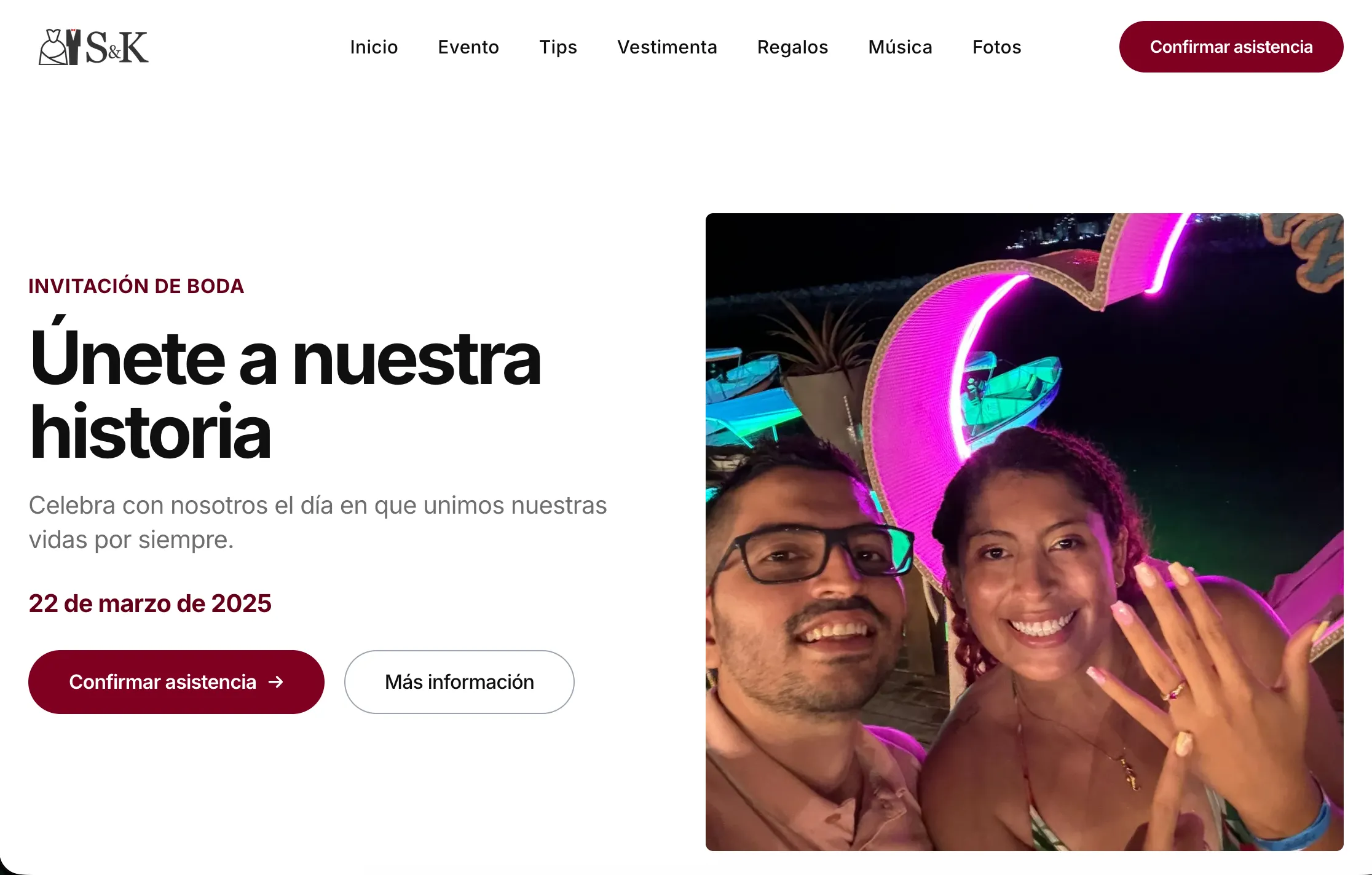
WeddingHero is what guests see first: “Únete a nuestra historia” with our photo, the wedding date (March 22, 2025), and two CTAs. Navigation at the top links to every section. Simple, immediate.
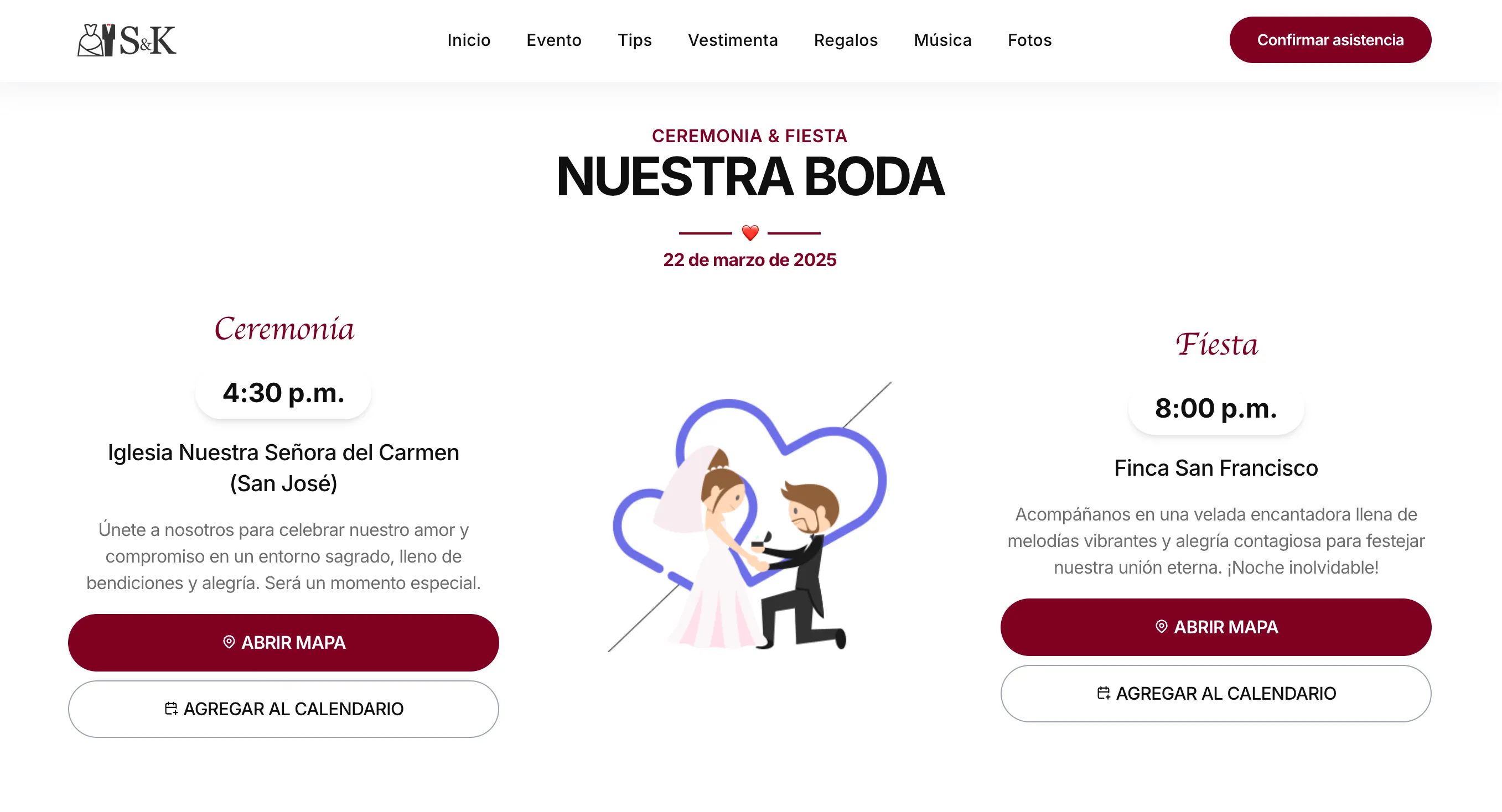
WeddingEvents shows ceremony and reception details. Each venue has a button that opens a Google Maps modal — a Svelte component that loads an embedded map on click. I almost went with static images and hardcoded links. Then I thought about guests trying to navigate from different starting points, opening it on mobile. The modal was the right call.
WeddingCountdown — a live countdown in days, hours, minutes, and seconds. Another Svelte component. A guest visiting six months out would see the full count; the morning of the wedding, much less. There’s something satisfying about a number that actually goes down.

WeddingTips covered the practical information: parking at both venues, arrive 15-20 minutes early (the ceremony starts on time, no exceptions), adult-only event, professional photographers on site, and two QR codes guests could scan on the day to share moments. The RSVP deadline was February 28th.
WeddingDressCode was Katherinerine’s specific request. Formal attire, two things to avoid: burgundy (the bridesmaids’ color) and white. I wasn’t sure how explicit to make that last point. Katherine was very sure.
WeddingGifts, WeddingSongs, WeddingPhotoGallery round out the content sections. The songs one — a Svelte modal where guests can suggest what they want played at the reception — was a last-minute addition that ended up being one of the most-used features. It uses the same Google Forms approach as the RSVP: the suggestion goes straight to a Spreadsheet, no backend needed. We didn’t want to miss a favorite because nobody thought to ask.
And then there’s WeddingRSVP. That’s the one that took the most work.
The Invitation System: 117 Personalized Codes
Here’s the part I’m most proud of, technically.
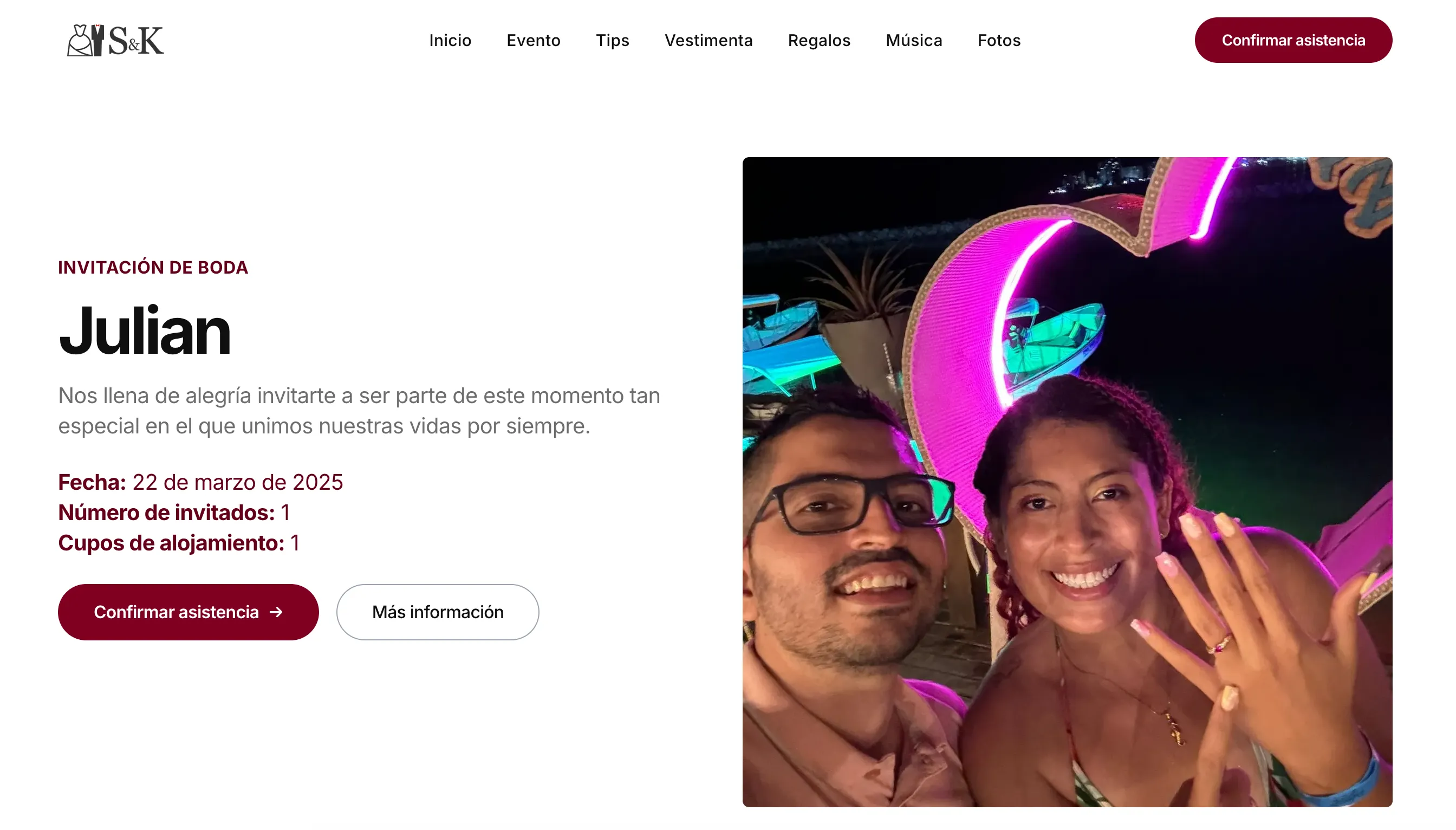
Every guest received a personalized invitation link. Not a generic URL — their specific link with a unique code embedded. For example, my brother Julian’s invitation was https://sergioykathe.com?invite=JU1330QY. When he opened that link, the site would read the code, look up his record in a local JSON file, and show a completely personalized experience: his name in the greeting, his specific invitation count, and an RSVP form pre-configured for his situation.
The guest data lived in public/data/invites.json — 117 records, each with a code, name, party invitations, accommodation invitations, genre, and whether it was a group invite. I managed this as a CSV spreadsheet (much easier to edit than JSON by hand), and wrote a small Node.js script that converted it to JSON for the frontend:
// scripts/csv-to-json.js
// Read invites.csv → parse with csv-parse → write invites.json
// Run once before each deploy when the guest list changes
The invite flow in src/lib/invite.ts:
export function getInviteId(): string | null {
  // 1. Read ?invite= parameter from the URL
  // 2. If found, persist to localStorage
  // 3. Clean the parameter from the URL (keeps it shareable and clean)
  // 4. On subsequent visits, read from localStorage
}
That URL cleaning was important. A guest opens sergioykathe.com?invite=JU1330QY, the code gets saved to localStorage, and the URL becomes sergioykathe.com — clean, shareable, without leaking invite codes if someone screenshots it. On every visit after that, the code comes from localStorage and the personalization stays intact.
Here’s what Julian saw when he opened his personalized link — the hero section transforms to show his name, his invitation count, and his accommodation slots:
InviteHandler.svelte handles the matching logic: loads the JSON, finds the code, passes the guest data to the RSVP components. If no valid code is found — someone arrived without a personalized link — a modal explains the situation.
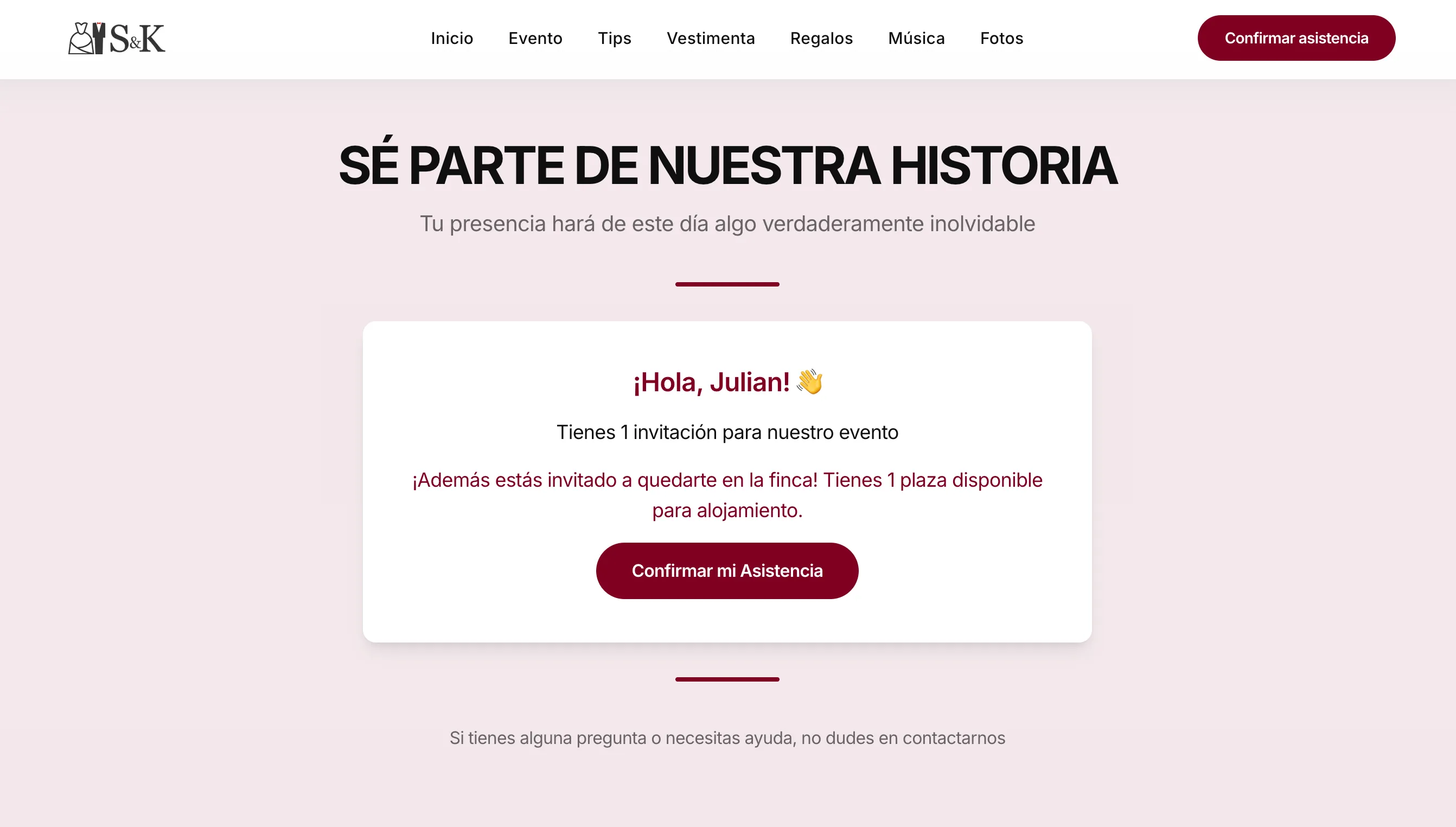
Further down the page, the RSVP section greets Julian by name and shows him exactly how many people he can bring and how many accommodation slots he has:
We started sending invitations months before the wedding. As the RSVP deadline approached, we used the site itself to follow up — sharing personalized links, reminding people their specific URL was waiting. The system worked exactly as designed.
Google Sheets as the Database
ConfirmModal.svelte — at 10KB, the largest component in the project — handles RSVP submission. The technique is the same one I documented years ago in my post about sending Google Forms via AJAX — inspect the form, grab the field IDs, and POST directly to the endpoint. When a guest confirms, it collects how many people from their party are attending the event and how many need accommodation, then POSTs that data to a Google Form endpoint:
await fetch(GOOGLE_FORM_URL, {
  method: 'POST',
  body: formData,
  mode: 'no-cors'  // Fire and forget — no response needed
})
This is what the confirmation modal looked like for Julian — dropdowns for party count and accommodation, a message field, and a single button to confirm:
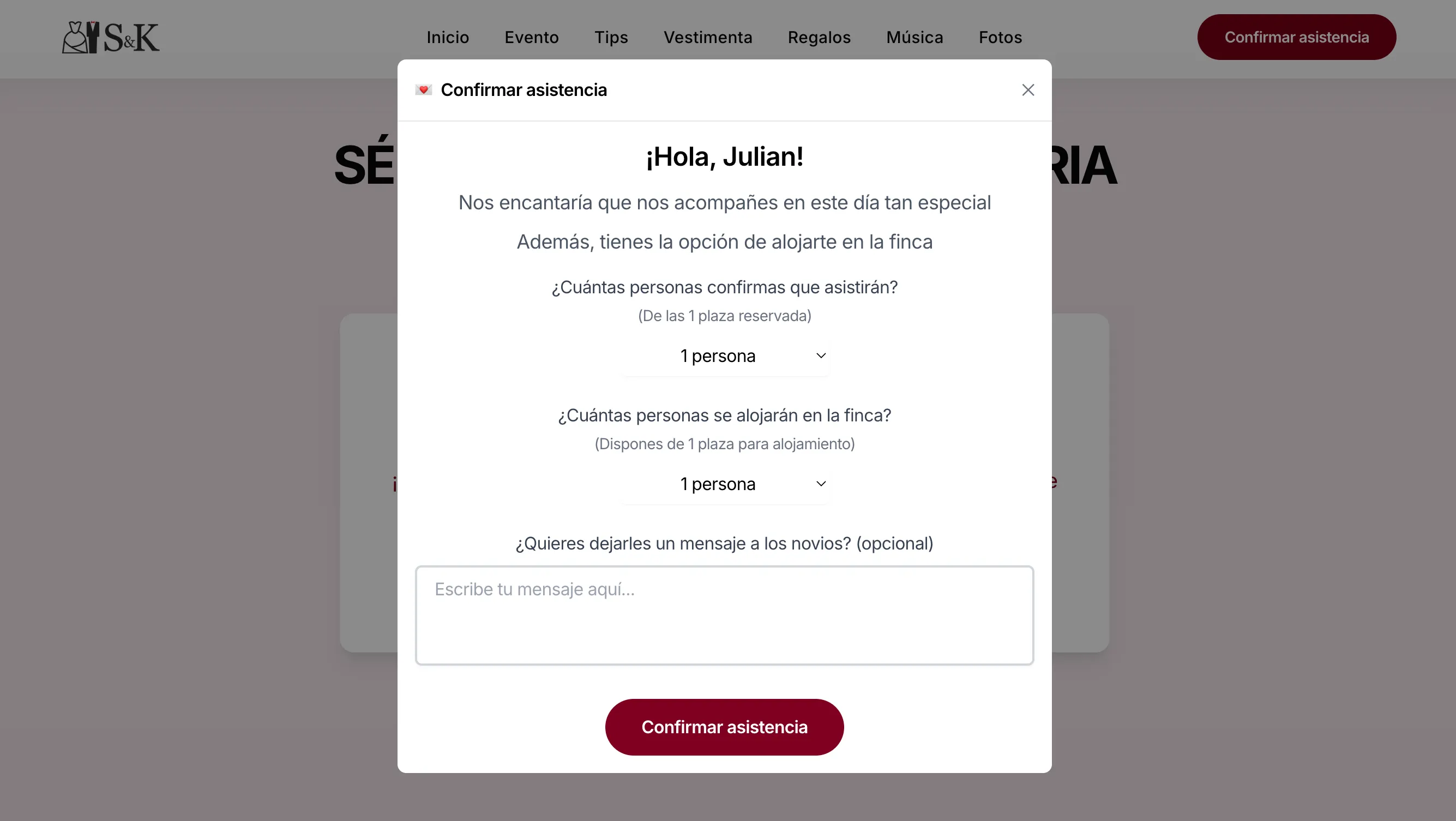
no-cors mode means we don’t get a response back — but the submission goes through. Google captures it, writes a row to a Spreadsheet, and that Spreadsheet became our live confirmation dashboard. Katherinerine could open it at any time and see who had confirmed, how many people were coming, who needed accommodation. No database, no admin panel, no backend bill. Just a Spreadsheet with automatic timestamps.
The confirmation is also stored in localStorage — so a returning guest sees their confirmed status rather than the form again. Small detail. The kind of thing guests never notice, but that would’ve felt broken if it wasn’t there.
Not a single submission issue. Static site, zero infrastructure — it just worked.
How the Two Weekends Actually Went
The repo was created December 15, 2024. By early January, the core was done.
First weekend (Dec 22-28): AstroWind integrated, v1.0.0 shipped. Then in one particularly intense day — December 27 — most of the wedding sections came together: hero, events with Google Maps, countdown, photo gallery, and the invitation widget. I don’t know why it all moved that fast. Sometimes you’re in the right flow and things just happen.
New Year’s Eve (Dec 31): RSVP system. Several commits over a few hours. I had planned to finish it earlier, but the personalization logic, validation, and state tracking were more involved than I’d estimated. I spent part of New Year’s Eve finishing it — my soon-to-be wife was probably not thrilled about that.
January 4 was analytics day: Google Analytics, Mixpanel, and PostHog, wired through a unified facade in src/lib/analytics.ts. Eight releases in one day. That kind of pace happens when something keeps almost working.
January 5 was the invitation code system — the ?invite= parameter, localStorage persistence, URL cleaning, personalized UI per guest. The highest-velocity day and the most interesting piece technically.
Then we started sending invitations. February arrived and we were still adding guests — Meri on the 28th, Mari the same day, Anita on March 2nd. Three weeks before the wedding. By then the deploy pipeline was fully automated: add a row to the CSV, run the conversion script, push, merge, deploy. Done in minutes.
March 22 arrived.
What I Learned Building for a Very Special Client
Building this was different from any client project I’ve done.
The requirements were clear from the start — Katherinerine knew what she wanted. But the meaning behind every section was personal in a way that product specs never are. The dress code section isn’t just content to fill. It’s guidance for people who matter to us. The gift registry isn’t a feature — it’s a communication about what we actually need. The song modal is how we’d hear from people we care about.
I also relearned something I keep having to relearn: simple constraints produce clean solutions. No backend, GitHub Pages, full static — those weren’t limitations. They were decisions that made the project maintainable, free to run, and done in time. Google Forms as the RSVP database wasn’t a workaround. It was the right tool for the job.
The site had nine sections, 117 personalized invitations, interactive maps, a live countdown, a song suggestion modal, a Svelte-powered RSVP system, analytics, CI/CD, and custom invite codes for every guest. All of it ran as a static file bundle on GitHub Pages. For free.
It worked de lujo.
Resources
- Live website: sergioykathe.com
- GitHub repository: xergioalex/sergioykathe.com

Stay in the loop
Get notified when I publish something new. No spam, unsubscribe anytime.
No spam. Unsubscribe anytime.