When building basic static websites — like landing pages or personal sites — you often need to connect a contact form. If you’re not using anything beyond HTML, CSS, and JavaScript (as is common with GitHub Pages), Google Forms is a solid option for storing visitor submissions.
Below is the process to connect your site’s contact form to a Google Form without embedding it in an iframe, using a simple HTTP request.
Submitting the Form via Postman
First, go to Google Forms and create a form like this:
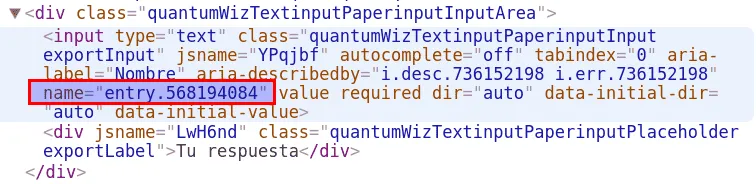
Next, open the form and inspect each field to find the name attributes of the inputs, which follow the format entry.{id}:
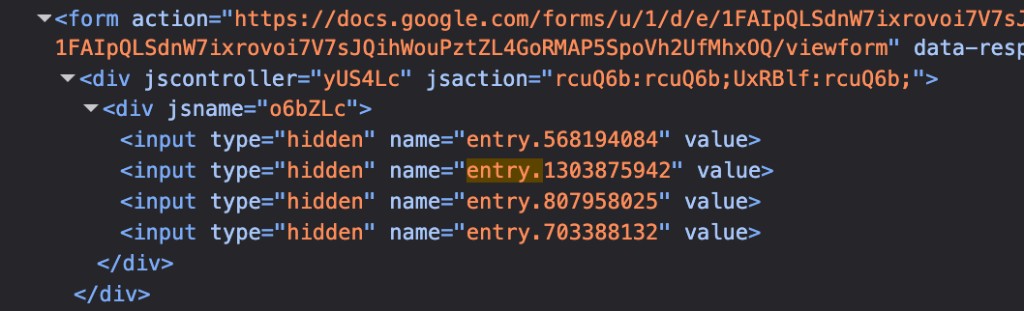
Tip: Another quick way to find all the field IDs is to inspect near the
<form>tag, where you’ll findhiddeninputs whosenameattributes start withentry., containing all the form field identifiers:
Once you have all the name values, you can submit the form by sending an HTTP request with Postman:
- Change the end of the form URL from
viewformtoformResponse:
https://docs.google.com/forms/d/e/1FAIpQLSdnW7ixrovoi7V7sJQihWouPztZL4GoRMAP5SpoVh2UfMhxOQ/viewform
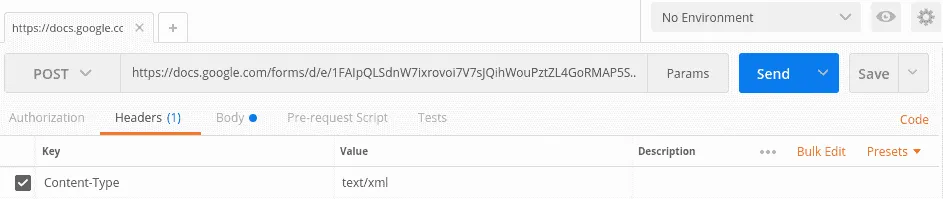
https://docs.google.com/forms/d/e/1FAIpQLSdnW7ixrovoi7V7sJQihWouPztZL4GoRMAP5SpoVh2UfMhxOQ/formResponse- Use
text/xmlas theContent-Typein the Headers:
- Define the body content. For this example form, the
namevalues for name, email, phone, and message areentry.568194084,entry.1303875942,entry.807958025, andentry.703388132respectively:
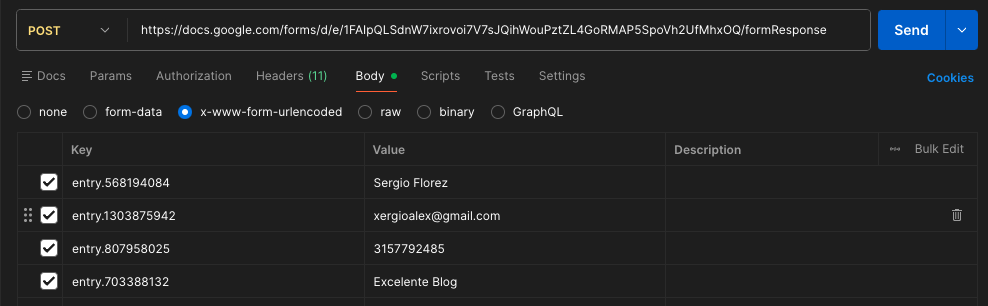
If you followed the steps above, you should be able to submit responses to the Google Form using Postman. Feel free to use my example form for testing; responses appear in this spreadsheet.
Submitting the Form via Ajax
Finally, it’s time to connect your web form via Ajax. Here’s a simple jQuery example:
$.ajax({
  url: 'https://docs.google.com/forms/d/e/1FAIpQLSdnW7ixrovoi7V7sJQihWouPztZL4GoRMAP5SpoVh2UfMhxOQ/formResponse',
  type: 'POST',
  crossDomain: true,
  dataType: "xml",
  data: {
    'entry.568194084': 'Value name field',
    'entry.1303875942': 'Value email field',
    'entry.807958025': 'Value phone field',
    'entry.703388132': 'Value message field'
  },
  success: function(jqXHR, textStatus, errorThrown) {
    console.log('Enter on success');
  },
  error: function(jqXHR, textStatus, errorThrown) {
    console.log('Enter on error');
  }
});
As you can see, we only needed to translate the Postman request into jQuery Ajax format. Here’s a minimal working example of a web form connected to the example form; you can try it out right here:
All submissions will appear in the response spreadsheet linked above:
One final note: when using this approach, you may see an error like No 'Access-Control-Allow-Origin' header is present on the requested resource. In other applications this is usually fixed by allowing the origin domain on the server, but Google Forms doesn’t expose such a setting. Despite that, the submission still succeeds, so you can safely ignore this message.
Thanks for reading. If you found this useful, feel free to share it.
Resources: GitHub repository with the code