OOP in Action: Building a Sudoku Solver and Contact Agenda with Java Swing
Some people have a moment when programming stops being “stuff that works” and becomes “systems that make sense.” For me, that moment came in Object-Oriented Programming — not from learning what a class is, or what inheritance does, but from learning that there are named solutions to common problems. That someone, decades ago, sat down and identified recurring patterns in how good software was built, gave them names, and wrote them down.
That was the shift. Not “here’s how Java works.” More like: “here are the blueprints that engineers use to solve hard problems, and we’re going to build something real with them.”
By the time I took this course, I wasn’t new to programming. I’d spent a semester staring at parentheses in DrScheme, another semester wrestling with pointers in C. I knew how to make things work. But OOP was different — it was about architecture. About thinking in patterns before writing a single line of code.
The course that taught me to think in patterns
The Object-Oriented Programming course at university wasn’t just about classes and inheritance. Those were the vocabulary. The real subject was design patterns — the Observer pattern, MVC, Factory, Singleton. The idea that when you encountered a particular kind of problem, there was probably already a well-documented, battle-tested approach for solving it. You just had to recognize the problem.
The professor was clear about what he wanted from us: not programs that worked, but programs that were designed well. Programs where you could look at the structure and immediately understand the reasoning behind every separation of concerns. Programs where changing one part wouldn’t break everything else.
Two projects from this course stand out above everything else. They’re the ones I keep coming back to when I think about where software architecture actually clicked for me.
The Sudoku assignment
The main event. The professor gave us the brief: build a Sudoku solver with a graphical interface. The requirements sounded deceptively straightforward — until you read the fine print.
Requirements: MVC architecture. Observer pattern for constraint propagation. Backtracking algorithm for solving. Java Swing for the UI.
This wasn’t “build a Sudoku game.” It was “build a Sudoku game the right way, using patterns you’ve just learned, in a language you’re still getting comfortable with, with a UI that actually looks good.”
The first day, I opened up a new Java project and stared at the blank file for a good twenty minutes. The temptation to just start writing — a board array, some loops, slap a grid on the screen — was real. But I knew that approach would collapse the moment I tried to wire the Observer pattern in later. So I forced myself to design first.
Designing the MVC architecture
The first decision was where everything would live. MVC — Model, View, Controller — means the data layer and the display layer are completely separated. The Model has no idea how the data will be shown. The View has no idea how the data works internally. They communicate through defined interfaces.
For the Sudoku solver, the split looked like this:
SudokuSrc/
  Model.java      # Sudoku board, cells, solver logic
  Watch.java      # Java Swing GUI + event handling
  board.txt       # Standard puzzle file
  board_Escargot.txt
Model.java — held everything that had to do with the Sudoku puzzle itself. A 9x9 matrix of Cell objects. Each Cell had a set of candidate values (the integers 1 through 9 that the cell could still legally contain). The Model handled constraint propagation, solving, cloning board states, loading puzzles from files. Zero UI code. Zero Swing imports. The Model could run headlessly and didn’t know or care whether any interface existed.
Watch.java — held the Java Swing JFrame, the grid of JPanels, all the event listeners, the buttons, the color rendering. It knew everything about how the puzzle looked but delegated all logic to the Model.
That separation sounds obvious when you write it out. In practice, when you’re a student who just wants to get something working, it requires real discipline. Every time I started writing something in Watch.java and thought “this needs to check if the cell is solved,” I had to stop, put that logic in Model.java, and expose it through a method. The boundary is easy to blur. Keeping it clean is a choice you make continuously.
The Observer pattern — the part that actually impressed me
Here’s where the design got elegant.
Each Cell in the Model extended Observable and implemented Observer. When the board was initialized, every cell registered itself as an observer of all other cells in its same row, the same column, and the same 3x3 box. Ninety-nine percent of Sudoku solvers work by brute force — try a number, check if it’s valid, move on. This approach was different.
When a cell got solved — when its value was definitively set — it notified all its observers:
// Cell extends Observable implements Observer, Iterable<Integer>
public void setValue(int value) {
    candidates.clear();
    candidates.add(value);
    setChanged();
    notifyObservers(value);  // Tell all related cells
}

// When a related cell is notified, remove that value from candidates
public void update(Observable o, Object arg) {
    int value = (Integer) arg;
    candidates.remove(value);
    if (candidates.size() == 1) {
        // Only one candidate left — auto-solve! (cascade)
        setValue(candidates.get(0));
    }
}
Look at that update method. When a cell learns that one of its related cells has been solved, it removes that value from its own candidates. If removing that value leaves only one candidate, it auto-solves itself — which triggers its own setChanged() and notifyObservers(), which propagates to its related cells, which may reduce their candidates, which may trigger more auto-solves.
The dominoes fall automatically. Set one cell, and the constraint propagation ripples across the board without any explicit solver code directing it. It just happens, through the event system.
This was the moment design patterns stopped being textbook theory for me. The Observer pattern wasn’t just “subscribe to events.” It was enabling a whole class of computation — constraint propagation — through a structure that was intuitive, self-contained, and didn’t require the board to orchestrate anything. The cells handled themselves.
The backtracking algorithm
The Observer-based propagation handles easy Sudoku puzzles completely. For medium and hard puzzles, you reach points where every unsolved cell still has multiple candidates, and no propagation can break the tie. That’s where backtracking comes in.
public boolean backtracking() {
    for (int i = 0; i < 9; i++) {
        for (int j = 0; j < 9; j++) {
            if (!board[i][j].isSolved()) {
                for (int candidate : board[i][j]) {
                    Model copy = board.clone();
                    copy.setValue(i, j, candidate);
                    if (copy.backtracking()) {
                        // Solution found — copy result back
                        this.cloneFrom(copy);
                        return true;
                    }
                }
                return false; // Dead end — backtrack
            }
        }
    }
    return true; // All cells solved
}
The key move here is that before trying each candidate, the board state is cloned. If that candidate leads to a dead end, the clone is discarded and the original state is untouched. This is the Clone pattern embedded inside backtracking — clean state management that makes the recursion predictable.
And crucially, backtracking doesn’t start from a blank slate. By the time it needs to kick in, the Observer propagation has already done the easy work — all the cells that could be logically deduced from constraints are already solved. Backtracking only has to navigate the genuinely ambiguous decisions, which are far fewer than they’d be in a pure brute-force approach. The two mechanisms complement each other perfectly.
The Java Swing interface
The visual layer was built around a 9x9 grid of JPanel objects, each 60x60 pixels. The interface had a few features that made it feel like a real application rather than a homework assignment:
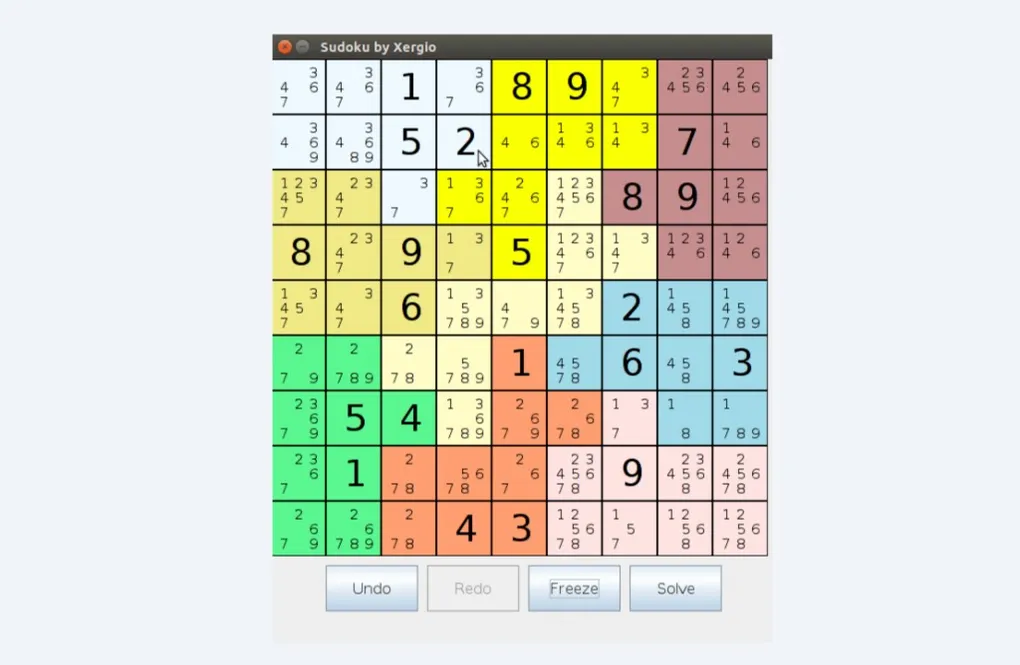
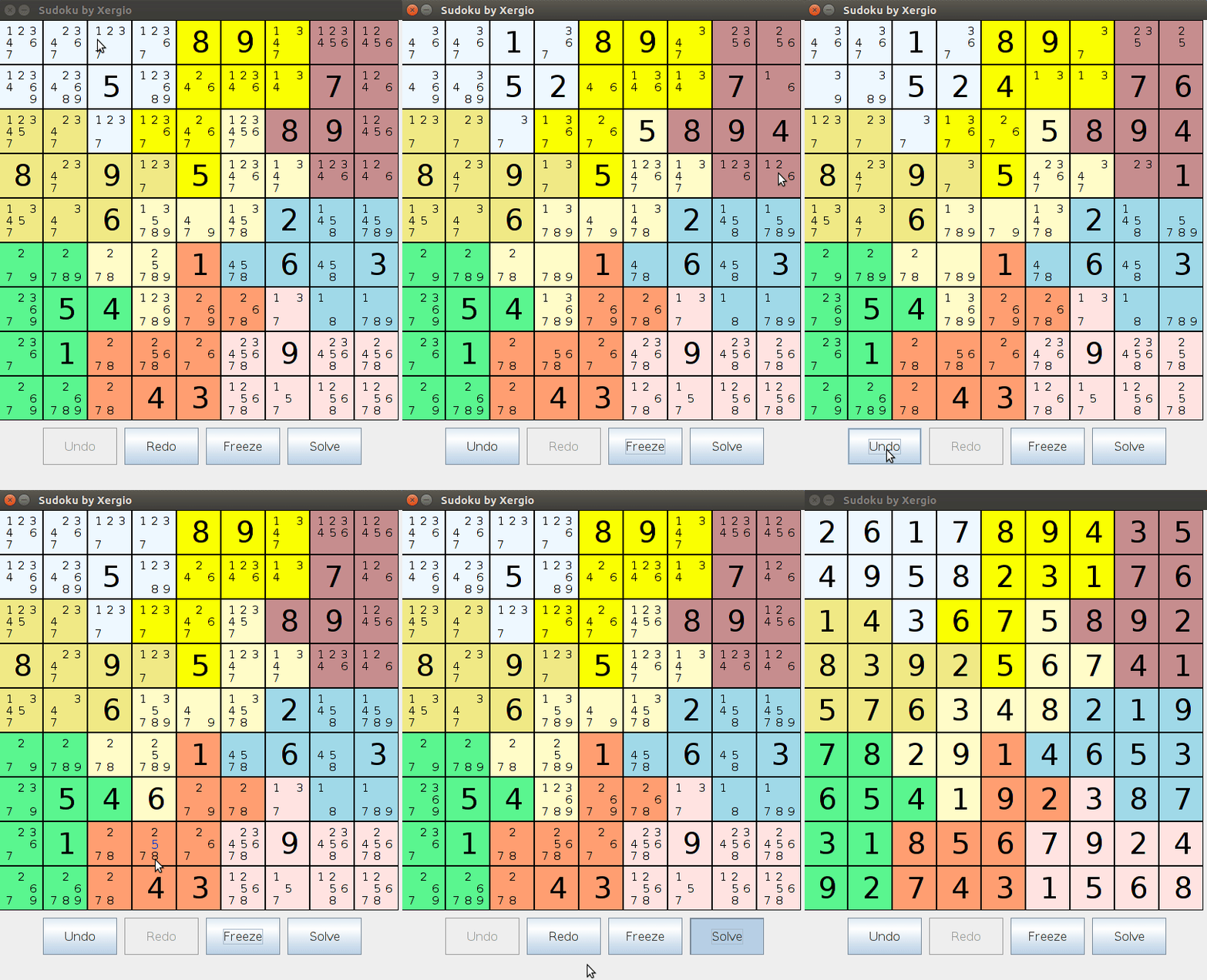
Color-coded regions. The nine 3x3 boxes were each rendered in a distinct color, making the structural regions of the board immediately readable at a glance. You never had to mentally trace the box boundaries — they were just there.
Candidate display. Each unsolved cell showed a 3x3 mini-grid of its remaining candidates. Instead of a blank space where you had to remember what was still possible, the board showed you exactly which values were still in play for each cell. Clicking any candidate in the mini-grid set that cell to that value.
Undo/Redo. Two Stack<Model> objects tracked the full board history. Every move cloned the current state onto the undo stack before committing. Undo popped from the undo stack and pushed to the redo stack. Multi-step history, both directions. This was straightforward to implement given that the Model was already clonable — a nice reward for the architectural discipline.
Error state. If the board reached an unsolvable configuration — a cell with no remaining candidates — a skull icon appeared. (calavera.gif. Yes, really. I was very proud of this detail.)
Solve button. Runs the full backtracking algorithm against the current board state and fills in the solution. Watching it run on a hard puzzle was genuinely satisfying.
Loading puzzles from files
Boards were stored in text files with a clever two-part format. The first nine lines described the region layout — which cells belonged to which 3x3 box, encoded as a character grid. The remaining lines gave the initial clue values as position-value pairs.
This meant you could encode any valid Sudoku board in a simple text file, and the application could load it at runtime. Several boards were included in the repo: standard beginner and intermediate puzzles, and then the famous Escargot — one of the hardest Sudoku puzzles ever published, designed in 2006 with only 22 initial clues specifically to defeat simple algorithms.
The Escargot was the test. Propagation alone can’t crack it — not even close. Backtracking has to dig deep. Watching the solver work through it and print the solution was the kind of payoff that makes the two weeks of implementation feel worth it.
The companion project: a contact agenda
The Sudoku solver was the project I was most proud of from the OOP course. But it wasn’t the only one.
Earlier in the semester, before the Sudoku assignment, we built a desktop contact management application. Simpler, but a clean exercise in the fundamentals: encapsulation, separation of concerns, event-driven programming, and file persistence.
The architecture was straightforward and deliberately clean:
Persona.java — the contact data model. Name, phone number, email address. With regex validation baked into the setters: names had to start with an uppercase letter, phone numbers had to be numeric, emails had to match a valid format. Validation at the model level, not scattered across the UI.
Agenda.java — the contact manager. A LinkedList of Persona objects. CRUD operations: add, delete, update, search by name or phone. Duplicate checking before insertion. All the business logic in one place, completely separate from the display.
Validator.java — centralized regex utilities. A separate class just for validation, because those patterns would be reused and keeping them co-located with the model would mix concerns.
Watch.java — the Java Swing interface, built with the NetBeans form designer. Input fields for each contact attribute, a JTable for displaying the contact list, confirmation dialogs before destructive operations, inline help tooltips on form fields. Event listeners wired to the Agenda’s methods.
File persistence via contactos.txt. Contacts were serialized as space-delimited lines on save and parsed back with BufferedReader and StringTokenizer on startup. Not glamorous, but it worked, and the contacts survived closing and reopening the application — which, to a second-year student, felt like genuine persistence magic.
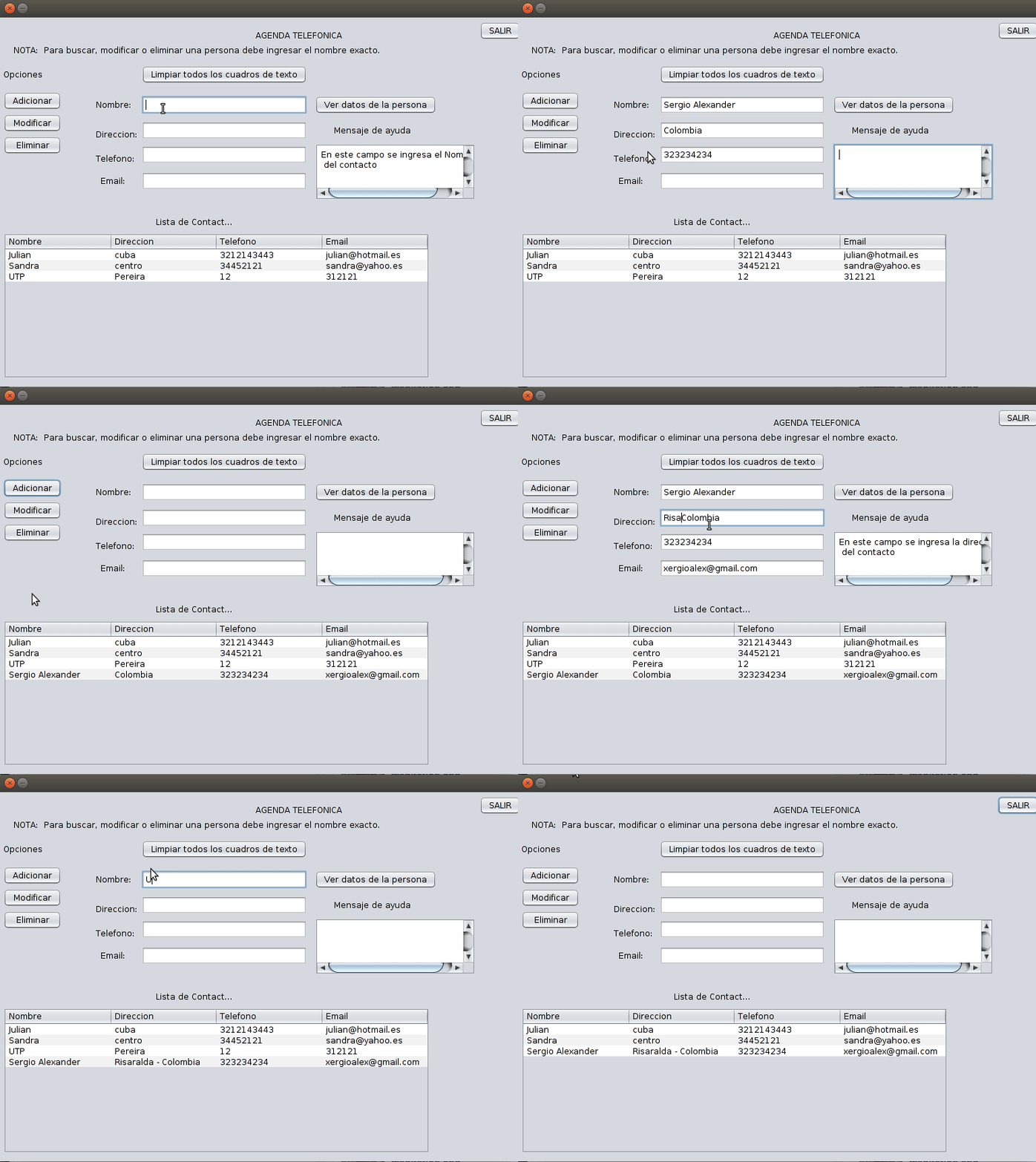
The agenda didn’t have the Observer pattern or backtracking or any of the cleverness that made the Sudoku solver interesting. What it had was clarity. Every class had one job. The data model didn’t know the screen existed. The UI didn’t implement any logic. The validation was centralized. It was the straightforward application of the principles the course was teaching — and building it first made the Sudoku architecture feel like a natural escalation rather than a leap.
What I actually learned
Here’s the honest version: I could have written a Sudoku solver without the Observer pattern. It would have been a big nested loop, an array of integers, and a lot of hardcoded logic. It probably would have worked. It definitely would have been faster to write.
But it would have been a mess. Changing anything about the constraint logic would have required touching everything. Adding a feature — say, highlighting cells affected by a move — would have meant injecting display code into the solver logic. The MVC separation would have collapsed. The whole thing would have become one of those programs you’re afraid to touch because you don’t know what will break.
The patterns weren’t overhead. They were the thing that made the software manageable. The same Model that runs the backtracking algorithm could be extracted and used in a web backend, or connected to a different UI framework, or tested in isolation without ever spinning up a Swing window. That’s not an accident — it’s the direct result of the architectural decision to keep the Model ignorant of the View.
The Observer pattern wasn’t just a homework checkbox either. It genuinely solved a problem I would have otherwise solved badly. Constraint propagation implemented as an explicit loop in the solver would have been clunky and tightly coupled. Implemented through events, it was elegant and automatic — the cells enforced constraints among themselves, and the solver just had to deal with whatever state remained.
These patterns kept showing up after university. Every web framework I’ve worked with since uses some form of MVC. Every reactive system — whether it’s Vue’s reactivity, React’s state, or Svelte’s stores — is a variant of the Observer idea. The specific syntax changes. The underlying pattern doesn’t. Learning it through a Sudoku solver in Java Swing turned out to be one of the more useful things I did in those years.
Looking back
It’s 2018 and I still think about those two projects when I’m designing something new and reaching for a pattern. Not because Java Swing is relevant — it isn’t, not for anything I’m building now — but because the problems those patterns solved are universal. State management. Event propagation. Separation of concerns. They come up in every non-trivial system.
If Programming 1 with Scheme taught me to think recursively, and Programming 2 with C taught me what the machine was actually doing, then OOP taught me to think architecturally. To ask, before writing any code: what are the pieces, what does each piece know about, and how do they talk to each other?
Starting with design patterns felt academic at the time — a lot of UML diagrams and vocabulary before any actual code. But the projects made it concrete. The Sudoku solver didn’t just demonstrate the Observer pattern; it showed me why the Observer pattern exists — what problem it was invented to solve, and how much cleaner the result is when you use it versus when you don’t.
If you’re curious about where this university journey started — with a very different kind of challenge — check out my first programming course with DrRacket, where parentheses and recursion taught me to think about computation from the ground up.
Let’s keep building.