Tracking the Invisible: How I Built AI Bot Analytics with Zero Client-Side JavaScript

This site runs on Cloudflare Pages. One of the things that comes with the platform is a functions/ directory — drop a TypeScript file in there, and Cloudflare auto-detects it and deploys it as edge middleware. Every request passes through it. Zero infrastructure to manage.
I had a specific use for that. This is what I built.
The Blind Spot
The analytics stack for this site turned out well. Umami for privacy-first event tracking. Cloudflare Web Analytics at the edge. Free, fast, no cookie banners or bloated scripts.
What I didn’t notice — or didn’t think through carefully enough — was who couldn’t be counted.
Both of those tools work the same way. A JavaScript snippet runs in the visitor’s browser. The snippet fires events. The events hit an API. The numbers go up on a dashboard. That chain only works if there’s a browser. If there’s a visitor who actually executes JavaScript.
These days, some of the most important visitors to a content site are not that kind of visitor.
The Problem With Crawlers
AI crawlers — GPTBot, ClaudeBot, PerplexityBot, the others — don’t browse the web the way humans do. They send an HTTP request, read the HTML, and leave. No browser, no JavaScript execution.
So every time GPTBot crawls a page, I see nothing. The request is served, the crawler consumes it, and my analytics register zero. For the dashboard, that visit never happened.
The ironic part: this site had gone out of its way to invite those crawlers. A robots.txt that explicitly named all twelve with Allow: /. llms.txt and llms-full.txt files for LLM consumption. Structured data to help AI systems understand the content.
I’d opened the door for them. I had no idea if anyone was coming in.
And it’s not just AI bots. RSS readers, search engine crawlers, monitoring tools — everything that doesn’t use a browser is invisible to client-side analytics. I’d been assuming “analytics” meant “JavaScript analytics” without questioning it.
The Solution
What I needed was simple: something that could inspect each request, look at the User-Agent header, and log the bot before serving the static content. The functions/ directory in Cloudflare Pages does exactly that — drop a TypeScript file in there and it deploys as edge middleware.
One file. No new dependencies, no changes to the Astro build.
Walking Through the Code
Here’s functions/_middleware.ts in full, with explanation of each part.
The Type Definitions
interface Env {
  PUBLIC_UMAMI_WEBSITE_ID?: string;
}

interface EventContext {
  request: Request;
  env: Env;
  next: () => Promise<Response>;
  waitUntil: (promise: Promise<unknown>) => void;
}
Cloudflare Pages Functions run in a Worker environment. The EventContext interface defines what the middleware receives: the incoming request, the environment (where I read secrets), a next() function to pass the request downstream, and waitUntil() for non-blocking async work.
I defined these interfaces inline rather than installing @cloudflare/workers-types. The types I need are few and stable — not worth adding a dependency.
The Bot List
const AI_BOT_PATTERNS: ReadonlyArray<{ pattern: RegExp; name: string }> = [
  { pattern: /GPTBot/i, name: 'GPTBot' },
  { pattern: /ChatGPT-User/i, name: 'ChatGPT-User' },
  { pattern: /ClaudeBot/i, name: 'ClaudeBot' },
  { pattern: /anthropic-ai/i, name: 'anthropic-ai' },
  { pattern: /Google-Extended/i, name: 'Google-Extended' },
  { pattern: /Bytespider/i, name: 'Bytespider' },
  { pattern: /CCBot/i, name: 'CCBot' },
  { pattern: /PerplexityBot/i, name: 'PerplexityBot' },
  { pattern: /Applebot-Extended/i, name: 'Applebot-Extended' },
  { pattern: /Amazonbot/i, name: 'Amazonbot' },
  { pattern: /Meta-ExternalAgent/i, name: 'Meta-ExternalAgent' },
  { pattern: /cohere-ai/i, name: 'cohere-ai' },
];
These are the same bots listed in robots.txt with explicit Allow: / rules. Not a coincidence — the open door and the sensor use the same list.
Each entry has a regex pattern and a clean name. The names show up in analytics events, so I wanted them readable. “GPTBot” is more useful in a dashboard than the raw User-Agent string.
The Detection Function
function detectAiBot(userAgent: string): string | null {
  for (const { pattern, name } of AI_BOT_PATTERNS) {
    if (pattern.test(userAgent)) {
      return name;
    }
  }
  return null;
}
Linear scan through the pattern list. First match wins. Returns the bot’s name if found, null if not.
Simple. The list is twelve items. A trie or more sophisticated matching would be premature optimization for something that runs on null results 99.9%+ of the time.
The Request Handler
export async function onRequest(context: EventContext): Promise<Response> {
  const userAgent = context.request.headers.get('user-agent') || '';
  const botName = detectAiBot(userAgent);

  // Non-bot requests: pass through immediately with zero overhead
  if (!botName) {
    return context.next();
  }

  // Bot detected: log to console (visible in CF dashboard real-time logs)
  const url = new URL(context.request.url);
  console.log(
    `[AI Bot] ${botName} → ${url.pathname} (${context.request.method})`
  );

  // Track to Umami via server-side API (non-blocking)
  const websiteId = context.env.PUBLIC_UMAMI_WEBSITE_ID;
  if (websiteId) {
    context.waitUntil(sendToUmami(websiteId, botName, context.request));
  }

  return context.next();
}
Every request goes through this function. If it’s not a bot, context.next() returns the response immediately — the overhead for human visitors is twelve regex tests, microseconds.
If a bot is detected, two things happen: a console log (for real-time visibility in the Cloudflare dashboard) and a context.waitUntil() call to Umami.
Then context.next() returns the actual page. The bot gets its response.
The Umami Payload
function buildUmamiPayload(
  websiteId: string,
  botName: string,
  url: string,
  hostname: string,
  language: string
): object {
  return {
    payload: {
      website: websiteId,
      url,
      hostname,
      language,
      name: 'ai_bot_visit',
      data: {
        bot: botName,
        path: url,
        method: 'GET',
      },
    },
    type: 'event',
  };
}
Umami’s server-side API accepts a JSON payload with a type and a payload. The event name is ai_bot_visit — the same one I use for all bot tracking. The custom data object attaches the bot name and path, which means I can filter by bot in the Umami dashboard.
The Tracking Call
async function sendToUmami(
  websiteId: string,
  botName: string,
  request: Request
): Promise<void> {
  const requestUrl = new URL(request.url);

  const body = buildUmamiPayload(
    websiteId,
    botName,
    requestUrl.pathname,
    requestUrl.hostname,
    'en-US'
  );

  try {
    await fetch(UMAMI_API_URL, {
      method: 'POST',
      headers: { 'Content-Type': 'application/json' },
      body: JSON.stringify(body),
    });
  } catch {
    // Silently fail — analytics should never break the site
  }
}
A fetch to Umami’s API wrapped in try/catch with an empty catch block. If Umami is down or the request times out, the site serves normally. Analytics should never break anything.
Decisions
Regex Instead of a Library
There’s no npm package for AI bot detection here. I looked at a few — isbot, crawler-user-agents — and honestly, they do more than I need. Twelve regex patterns do the job. The patterns come from the official documentation for each bot (OpenAI, Anthropic, Google, etc.), and they’re stable enough that a regex approach will outlast any library that wraps them.
The tradeoff: when a new AI bot appears and I want to track it, I update the array and the robots.txt file. Two places. Manual, but obvious. If I used a library, I’d be waiting for a release cycle instead of making a two-line change.
waitUntil() Instead of await
This one matters. If I had written:
await sendToUmami(websiteId, botName, context.request);
return context.next();
Then every bot visit would block waiting for the Umami API call to resolve before returning a response. For a bot that doesn’t care about latency, this is pointless. For edge performance, it’s actively bad.
context.waitUntil() registers a promise that resolves after the response is sent. The bot gets its page immediately, the Umami call runs in the background. Do the minimum before responding, defer the rest.
The Same Umami Instance
I track AI bots to the same Umami website as human visitors — not a separate project. The events are tagged ai_bot_visit and carry data.bot so I can filter and segment. But the data lives in the same place.
The alternative was a separate Umami site just for bots. I thought about it for about thirty seconds and decided it was over-engineering. I want to see bot traffic alongside human traffic — same dashboard, same timeline, same context. A bot visiting the blog the same week as a traffic spike from a shared article is interesting. In separate dashboards, that correlation is harder to spot.
The environment variable PUBLIC_UMAMI_WEBSITE_ID is already set in the Cloudflare dashboard — the middleware reads it from context.env. I didn’t add a new secret or a new environment variable. The infrastructure was already there.
What I Can See Now That I Couldn’t Before
The first deploy, nothing happened. No logs, no events. I thought I had a bug. Turns out I just had to wait — bots don’t visit on your schedule. About an hour later, [AI Bot] GPTBot → /blog/building-xergioalex-website/ (GET) scrolled past in the Cloudflare real-time logs.
That’s a real OpenAI crawler, reading one of my blog posts. I have no idea which model training run it fed into, or whether the content ended up in any fine-tuning dataset. But I can see it happened. That’s the thing. Before this, it was invisible. Now it’s logged.
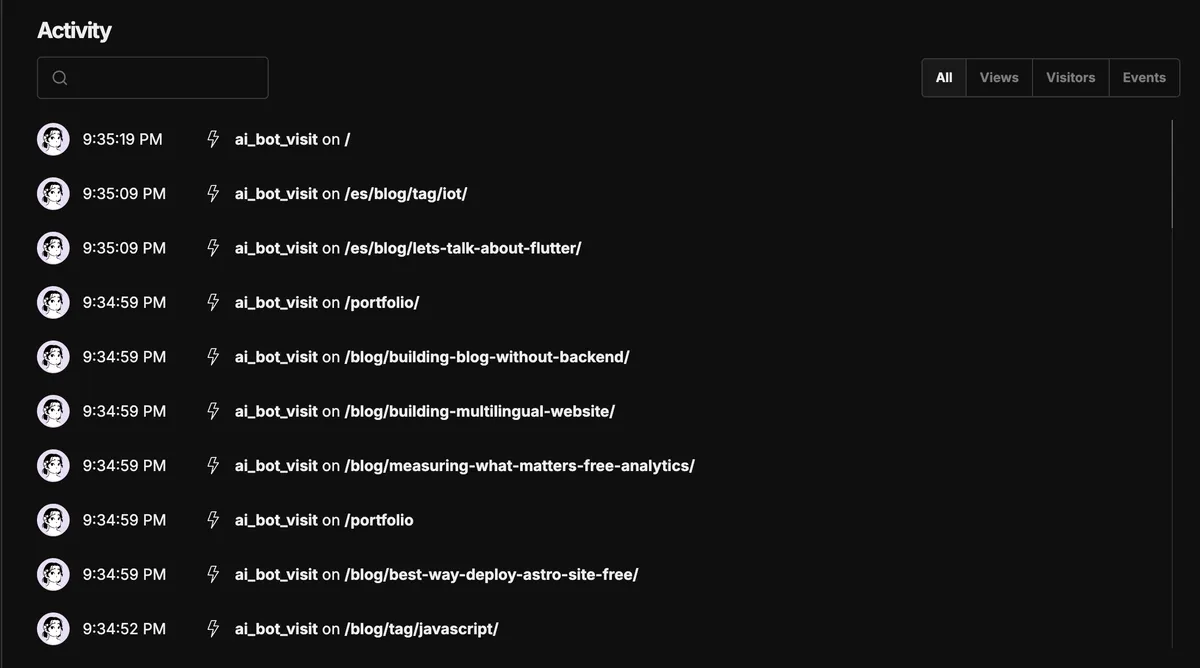
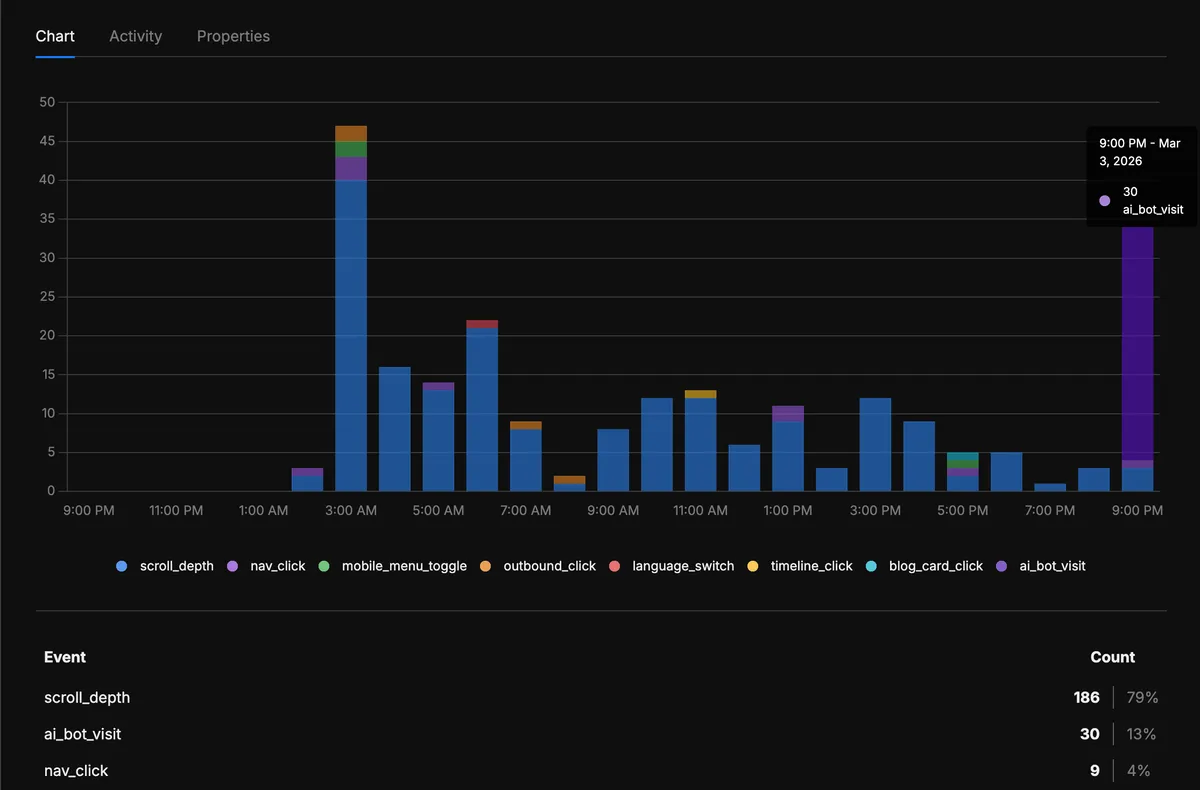
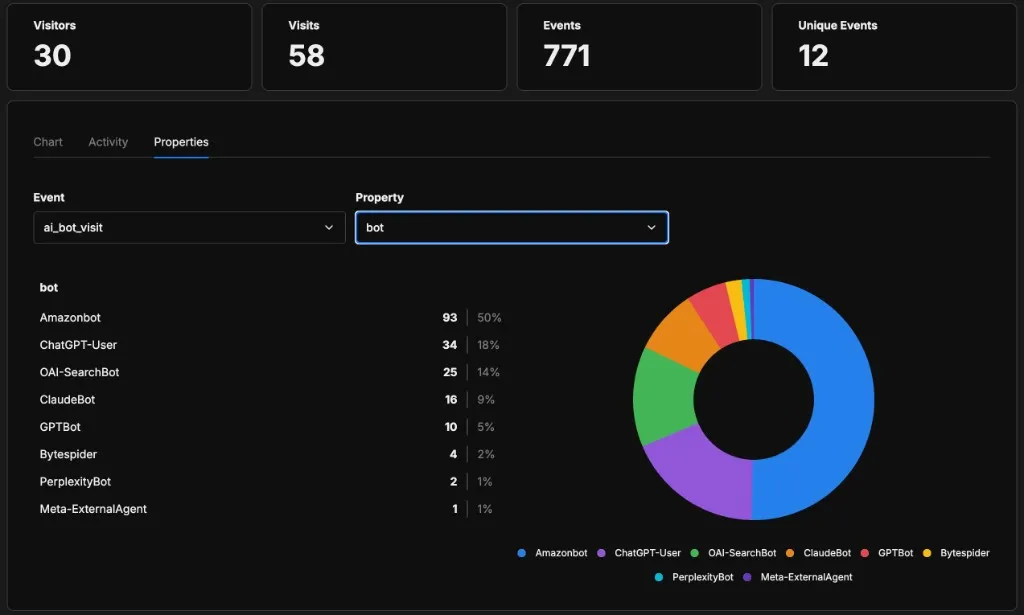
In Umami, ai_bot_visit events show up in the custom events section with the bot name attached. I can filter by bot = ClaudeBot, see what pages Anthropic’s crawler has visited, and compare that to the page view distribution from human readers. I can track whether bot traffic correlates with publishing new posts. I can see which sections of the site get crawled most.
This is what the activity feed looks like — each ai_bot_visit event with the page the bot crawled:
And in the events chart, the ai_bot_visit events start showing up alongside the rest of the site’s analytics — same dashboard, same timeline:
Because each event carries the bot property, I can break down traffic by crawler. Filtering by the bot property on ai_bot_visit gives me this — a clear picture of who’s actually coming through the door:
With client-side analytics none of this existed. With one middleware file, now it does.
Catching the Ones I Don’t Know Yet
I was pretty happy with the setup until I realized something obvious that I’d overlooked: this thing only tracks bots I already know about. Twelve names in a list. If tomorrow some new AI company launches a crawler called DeepWhateverBot, it sails right through detectAiBot(), gets a null, and vanishes. I’d built a fix for a blind spot that had its own blind spot.
There were five or six AI crawlers when I first put together robots.txt. Now there are twelve. By the time you read this, who knows. The list will always lag behind.
The fix was simple enough — after the known-bot check fails, look for generic bot signals in the User-Agent. If the string contains bot, crawler, spider, scraper, or fetcher, it’s probably not someone’s Chrome browser:
const BOT_KEYWORD_PATTERN = /bot[\/\s;)]/i;
const SPIDER_CRAWLER_PATTERN = /crawler|spider|scraper|fetcher|agent[\/\s;)]/i;

function isUnknownBot(userAgent: string): boolean {
  if (!userAgent || userAgent.length < 5) return false;
  if (IGNORED_BOTS_PATTERN.test(userAgent)) return false;
  return BOT_KEYWORD_PATTERN.test(userAgent)
    || SPIDER_CRAWLER_PATTERN.test(userAgent);
}
I had to add an ignore list for the obvious stuff — Googlebot, Bingbot, YandexBot, uptime monitors like UptimeRobot and Pingdom. Those aren’t what I’m looking for, and logging them would drown the signal in noise.
Unknown bots get their own event: unknown_bot_visit, separate from ai_bot_visit. The full User-Agent string goes into the event properties — I want to see exactly what showed up, not just that something did. The middleware grabs a readable name from the first token:
function extractBotName(userAgent: string): string {
  const match = userAgent.match(/^([^\s\/]+)/);
  const name = match ? match[1] : userAgent;
  return name.slice(0, 60);
}
So the request handler now has two paths:
export async function onRequest(context: EventContext): Promise<Response> {
  const userAgent = context.request.headers.get('user-agent') || '';
  const botName = detectAiBot(userAgent);

  if (botName) {
    // Known AI bot → track as ai_bot_visit
    // ...
    return context.next();
  }

  // Check for unknown bots
  if (isUnknownBot(userAgent)) {
    const name = extractBotName(userAgent);
    // Track as unknown_bot_visit with full User-Agent attached
    // ...
  }

  return context.next();
}
Now when something new shows up crawling the site, I’ll see it in Umami under unknown_bot_visit. If it’s an AI crawler worth tracking properly, I promote it: one line to AI_BOT_PATTERNS, one line to robots.txt. That’s it. The first version could only see what I told it to look for. This one can also tell me what I’m missing.
My hypothesis was that blog posts would dominate bot traffic — long-form text is what language models scrape the most. I also expected llms.txt to get visits from crawlers doing a quick inventory. Whether that’s the case, the data will show.
Let’s keep building.
Resources

Sergio Alexander Florez Galeano
CTO & Co-founder at DailyBot
Colombian software engineer and entrepreneur (DailyBot, YC S21). I write about AI agents, developer tools, startups, and the craft of software engineering — and I build this site in the open at XergioAleX.com.
Stay in the loop
Get notified when I publish something new. No spam, unsubscribe anytime.
No spam. Unsubscribe anytime.