Reaching 100 on isitagentready.com: What Your Site Needs in the Era of Agents
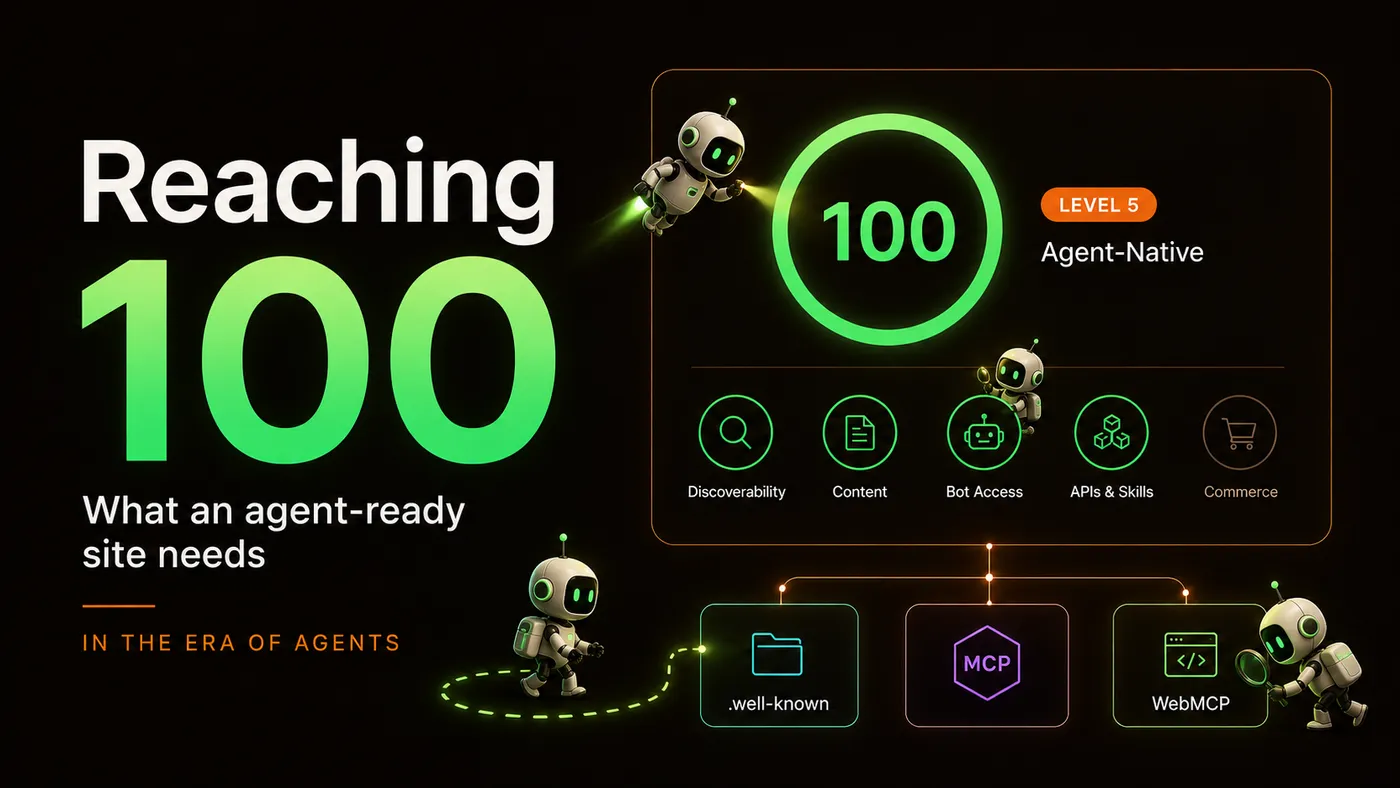
A few days ago I published my recap of Cloudflare’s Agents Week 2026. One tool from that week fit so well with my series AEO: From Invisible to Cited that it deserved its own post: isitagentready.com. It turns a vague question — “is my site ready to be discovered by AI?” — into a single number between 0 and 100. Four categories, each with its own spec, each with a pass/fail check.
I scanned my site on the first try and got 33/100.
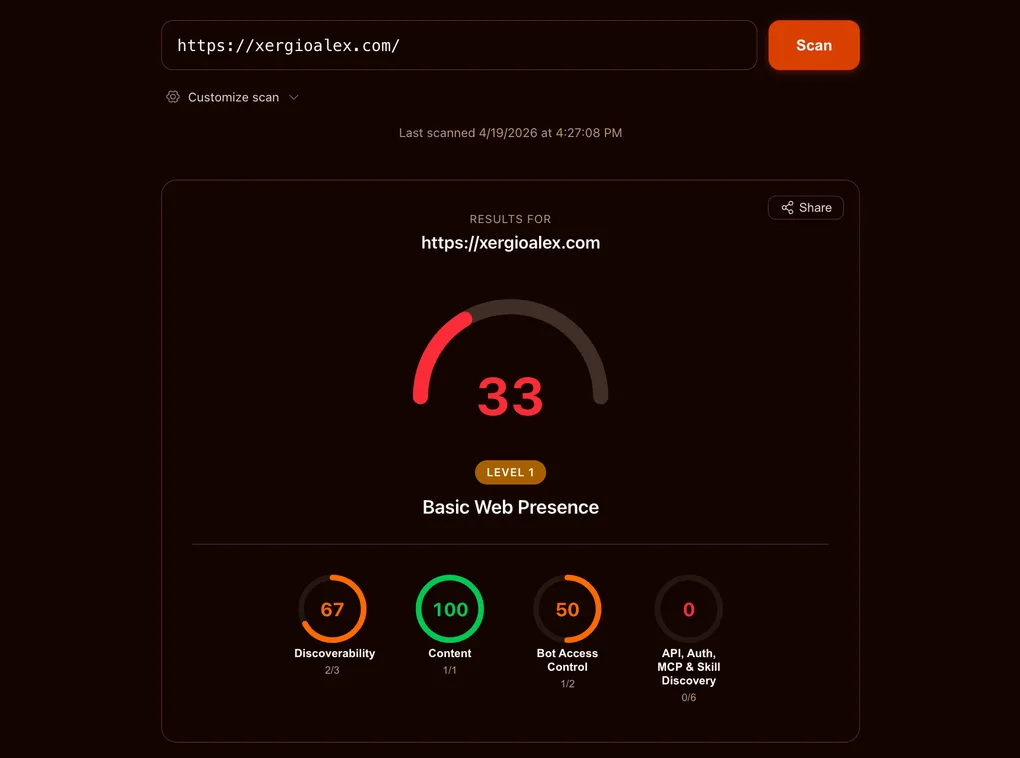
What was interesting about that 33 wasn’t that work was missing. It was how different the missing work was: it wasn’t SEO or performance or accessibility — it was a new layer. .well-known/ files, headers no human will ever read, a browser API that barely exists as a draft. The era of agents didn’t arrive with a keynote; it arrived with a scorecard that suddenly grades something we didn’t know was being graded.
This post is a practical guide: for each of the four categories the scorecard measures, what the spec actually requires, and exactly what I put on my site to earn every point. If your site is content, marketing, or documentation, this guide applies with almost no adjustments.
Before we get into it, a note about the 33: it came with a head start. The Content category was at 100 on the first scan because my site had already started speaking the language of agents. Three pieces were in place:
-
Markdown for bots. In an earlier post, Markdown for Agents, I set up the site so that when an AI bot requests a page with the
Accept: text/markdownheader, the server returns a clean Markdown version instead of the tangled HTML only a browser needs — Markdown is the format models prefer to read. You can try it against this very page:curl -H "Accept: text/markdown" https://xergioalex.com/blog/aeo-reaching-100-isitagentready/ -
llms.txtandllms-full.txt. Two files that work like a site map, but built for agents instead of search engines like Google. -
AI bot detection. A small piece of code in
functions/_middleware.tsthat runs on the server before each response, identifies known AI bots, and logs every visit.
All that prior work explains the 33 starting point: it’s the natural score for a site that has already started speaking the language of agents but still hasn’t shipped the other pieces the scorecard demands — pieces almost no one was shipping yet.
What comes next in the post are the other three categories: what each one demands, and exactly what I built to cover it.
What the scorecard actually measures
Before the work, a short orientation. isitagentready.com splits “agent-ready” into four categories, each with its own set of checks:
- Content — is your content in a form AI agents can parse cleanly? (Markdown endpoints, content negotiation, structured data.)
- Discoverability — can an agent that does a single
HEAD /find your site’s programmatic surface? (Link headers, canonical metadata.) - Bot Access Control — have you told AI crawlers what they can and can’t do with your content? (Signals in
robots.txt.) - APIs, Auth, MCP & Skill Discovery — is your programmatic surface described in the canonical
.well-known/*files, with OAuth discovery metadata and MCP server cards? (Six JSON documents plus a browser API.)
Each category that isitagentready.com checks has an associated SKILL.md file: a short document, defined by Cloudflare, that acts as a manual for a single capability. It tells you what the tool checks, what file or HTTP header your site must serve, what the minimum valid example looks like, and what common mistakes to avoid. It’s the contract between what your site publishes and what an agent expects to find.
Before writing any code, the eight SKILL.md documents covering those four categories were my source of truth. Every artifact in this post matches their examples byte for byte.
Where a spec required a field that doesn’t apply to my case, I filled it honestly and added a _comment explaining the situation; where it accepted a minimal JSON, I shipped the minimum. Everything is reproducible.
One heads-up before the work. Since I first published this, isitagentready.com has added a fifth category — Commerce — that checks whether AI agents can pay your site. For a content site that sells nothing it reports not checked, which is the right call. I cover what it checks, and why I’m leaving that circle gray, a bit further down.
The 33/100 baseline
Here’s how the breakdown looked on the first scan:
| Category | Score | What was missing |
|---|---|---|
| Content | 100 / 100 | Nothing — .md endpoints were already live. |
| Discoverability | 67 / 100 | Link: response header on / and /es/. |
| Bot Access Control | 50 / 100 | Content-Signal directive in robots.txt. |
| APIs, Auth, MCP & Skills | 0 / 100 | All six .well-known/* documents + WebMCP. |
Most content sites today would land in roughly the same place. That’s the point of the scorecard: it defines a new baseline, not a review of the old one. The work splits into three buckets — a couple of header / robots edits, six JSON documents under .well-known/, and one small browser component.
Time to go category by category.
Content: already at 100 (thanks to earlier work)
Content was at 100 from day one because of earlier work in the series. Markdown for Agents set up a content-negotiation layer that serves clean Markdown versions of every page to AI crawlers — and standalone .md endpoints at predictable paths. The scorecard’s Content check looks for that structure: if a crawler sends Accept: text/markdown, does the server respond with real Markdown instead of an HTML soup it has to scrape?
For xergioalex.com, the answer is yes. The Cloudflare Pages middleware at functions/_middleware.ts watches incoming Accept headers; if an AI bot asks for Markdown, the middleware pulls the matching .md file from the build output and returns it with a Content-Type: text/markdown; charset=utf-8 header. Every HTML page has a matching .md counterpart — verified by the md:check parity script that runs as part of CI.
Discoverability: one line in _headers
The Discoverability check looks for a Link: HTTP response header pointing at a machine-readable description of your site’s programmatic surface. RFC 8288 defines the format; RFC 9727 §3 registers api-catalog as a valid relation type. The SKILL.md accepts any of api-catalog, service-desc, service-doc, or describedby — I picked the most specific one and pointed it at the API catalog we build later in this post.
On Cloudflare Pages, response headers live in public/_headers:
/
  Link: </.well-known/api-catalog>; rel="api-catalog"

/es/
  Link: </.well-known/api-catalog>; rel="api-catalog"
That’s literally the whole fix. Discoverability went from 67/100 to 100/100. Both the English and Spanish homepages emit the header on every response.
One caveat that cost me a minute: Cloudflare Pages applies _headers rules at the edge, not in the Astro build. The headers don’t show up on a local npm run dev server. I verified by building locally with npm run build, then running wrangler pages dev dist and inspecting the response with curl -sI http://localhost:8788/ — the Link: header shows up there.
Two lines of config, one file, done.
APIs, Auth, MCP & Skill Discovery: six JSON documents + one browser bridge
This is the category where 0 becomes 100 in one shot — six of my eight artifacts live here, plus the WebMCP bridge. The scorecard checks for:
/.well-known/api-catalog— a linkset listing your APIs with links to their OpenAPI specs and human docs./.well-known/oauth-authorization-server— metadata for the OAuth authorization server./.well-known/oauth-protected-resource— which resources are protected and by which authorization servers./.well-known/mcp/server-card.json— the MCP server card announcing your site’s capabilities./.well-known/agent-skills/index.json— an index of the agent skills your site publishes, each with a SHA-256 digest.- A browser-level WebMCP surface — agents running in the user’s browser can call
navigator.modelContext.registerTool()to find tools you expose.
The honest OAuth call
Before I built anything, I had a design question to resolve. xergioalex.com is a static content site. It has read-only JSON endpoints — /api/posts.json, /api/series/{lang}, and so on — but no protected resources, no user authentication, and no bearer tokens. The scorecard’s OAuth checks still want six required fields on /.well-known/oauth-authorization-server and two on /.well-known/oauth-protected-resource. What do you put in those fields when you have nothing to protect?
Three options were on the table:
- Honest stub — publish the required fields with real-looking reserved-path endpoints. Add a
_commentfield explaining the situation. - Point at a real upstream issuer — only honest if the site actually uses one. It doesn’t.
- Skip — accept a scorecard deduction, don’t hit 100/100.
I picked option 1. The spec requires presence of the fields, not function of the endpoints. An agent that reads the discovery metadata can see, in the same document, that the authorization endpoint is a reserved path that doesn’t accept real OAuth flows yet. The _comment field makes this explicit:
{
  "_comment": "xergioalex.com has no protected APIs today. This document is published for agent-readiness compliance per RFC 8414 / OIDC Discovery 1.0. Endpoints are reserved paths; they do not currently accept real OAuth flows.",
  "issuer": "https://xergioalex.com",
  "authorization_endpoint": "https://xergioalex.com/oauth/authorize",
  "token_endpoint": "https://xergioalex.com/oauth/token",
  "jwks_uri": "https://xergioalex.com/.well-known/jwks.json",
  "grant_types_supported": ["authorization_code"],
  "response_types_supported": ["code"]
}
For /.well-known/oauth-protected-resource, the honest shape is a self-reference: this resource is governed by this site’s own (stub) authorization server. It’s a tautology, but a true one, and RFC 9728 permits it.
Translation: honesty beats theatre. Documents that point at nothing but tell you they point at nothing are better than documents that lie. An agent can reason about that.
The API catalog
RFC 9727 defines the API catalog as an application/linkset+json document — JSON with a specific Content-Type flag — at /.well-known/api-catalog. Each linkset entry anchors at a base URL and carries links[] with two required rel values: service-desc (machine-readable spec, usually OpenAPI) and service-doc (human documentation).
The site had no OpenAPI spec, so I wrote a minimal one at public/openapi.json — a 3.1 document covering /api/posts.json, /api/posts-en.json, /api/posts-es.json, /api/series/{lang}, and /api/timeline/{lang}. Shorter than a weekend project; the schemas lean on type: array and type: object without exhaustively modeling every field.
The catalog itself points service-desc at that OpenAPI file and service-doc at llms.txt (already shipped from the earlier Markdown-for-Agents work):
{
  "linkset": [
    {
      "anchor": "https://xergioalex.com/api/",
      "links": [
        { "rel": "service-desc", "href": "https://xergioalex.com/openapi.json", "type": "application/json" },
        { "rel": "service-doc", "href": "https://xergioalex.com/llms.txt", "type": "text/plain" }
      ]
    }
  ]
}
The file sits at public/.well-known/api-catalog — no extension, on purpose. The Content-Type is application/linkset+json, not the default application/json, so I added an override in public/_headers:
/.well-known/api-catalog
  Content-Type: application/linkset+json
  Cache-Control: public, max-age=300, must-revalidate
This detail cost me a rebuild. The first version served as application/json and I was surprised the scorecard rejected it. The SKILL.md literally says “NOT application/json” in the pitfalls section. I missed it. Read your specs.
MCP server card and the skills index
MCP Server Card (SEP-1649) lives at /.well-known/mcp/server-card.json. The structure is four fields: serverInfo.name, serverInfo.version, transport.endpoint, and capabilities[]. The capabilities array takes string values from tools, resources, prompts — flat strings, not a nested object as I initially drafted.
The Agent Skills Discovery index is where it gets interesting. Cloudflare’s RFC v0.2.0 defines /.well-known/agent-skills/index.json as a document with a $schema identifier (opaque — it doesn’t have to resolve) and a skills[] array. Each entry names a skill, links to a SKILL.md file, and includes a SHA-256 digest — a file fingerprint, same idea as a Git commit hash — of that file’s served bytes.
I could have authored my own SKILL.md files. For now, I’m in pointer mode: my index references Cloudflare’s eight canonical SKILL.md files at isitagentready.com/.well-known/agent-skills/<skill>/SKILL.md, with the digest computed from Cloudflare’s served bytes at generation time. A small script at scripts/generate-agent-skills-index.mjs fetches each URL, hashes it, and writes the index:
async function sha256OfUrl(url) {
  const res = await fetch(url);
  const bytes = new Uint8Array(await res.arrayBuffer());
  const hex = createHash('sha256').update(bytes).digest('hex');
  return `sha256:${hex}`;
}
The first run produced the wrong digest. I’d hashed the local in-memory representation of the response — but the spec wants the bytes as served. Fix: a one-line change, using arrayBuffer() instead of a text() round-trip through a string. The index now has eight entries, each with a real digest that matches what Cloudflare’s CDN serves.
The generator runs on prebuild, wired in package.json:
"prebuild": "npm run generate:agent-skills-index",
"generate:agent-skills-index": "node scripts/generate-agent-skills-index.mjs"
Every future build regenerates the index from live Cloudflare bytes. If Cloudflare revs a SKILL.md, the digest updates on the next deploy.
WebMCP: the browser surface
The last check in this category is the only one that isn’t a static file. WebMCP is a browser API — navigator.modelContext.provideContext() — and the scorecard loads the page in a headless browser to see whether your site publishes any tools on load.
Each tool needs name, description, a valid JSON Schema inputSchema, and an execute callback. The modern spec takes them all at once via provideContext({ tools }); an older variant accepts them one-by-one via registerTool(tool, { signal }). The scanner times out if neither call happens within its browser session, so the bridge has to hydrate early.
I wrote a Svelte 5 component at src/components/agent/WebMCPBridge.svelte. It renders nothing visible. It mounts on client:load — hydrate on page load, not on idle, to beat the scanner’s timeout — feature-detects the API, and publishes three read-only tools that map to endpoints the site already exposes. Modern browsers get the provideContext path; legacy shims fall back to registerTool with an AbortController signal so the registration can be revoked when the component unmounts:
const tools = [
  {
    name: 'search_blog',
    description: 'Search xergioalex.com blog posts by keyword.',
    inputSchema: {
      type: 'object',
      properties: { q: { type: 'string' }, lang: { type: 'string', enum: ['en', 'es'] } },
      required: ['q'],
    },
    execute: async ({ q, lang: l }) => { /* fetch /api/posts-{lang}.json, filter, return top 20 */ },
  },
  // list_series, open_post...
];

if (typeof mc.provideContext === 'function') {
  mc.provideContext({ tools });
} else if (typeof mc.registerTool === 'function') {
  for (const tool of tools) mc.registerTool(tool, { signal });
}
Three tools, all read-only: search_blog, list_series, open_post. No writes, no destructive actions, nothing cross-origin. Wiring is one import plus one element inside MainLayout.astro. Every page using the layout — effectively the entire public site — now ships the bridge.
Bot Access Control: the Content-Signal directive in robots.txt
The Bot Access Control check looks for your site to say something about how AI crawlers can use your content. The signal lives in robots.txt and is called Content-Signal — an IETF draft that extends traditional Allow/Disallow with three AI-specific axes: ai-train, search, and ai-input. The scanner only grades that the directive is present and syntactically valid; the values are your choice.
This is the directive I picked:
User-agent: *
Allow: /
Disallow: /api/
Content-Signal: ai-train=yes, search=yes, ai-input=yes
Reasoning: the three axes are independent. ai-train controls whether your content can be used to train future LLM base models, search controls classic search-engine indexing, and ai-input controls whether your content can be retrieved and quoted in real-time AI answers (ChatGPT Search, Perplexity, Google AI Overviews, Claude Search). For a personal technical blog whose currency is being read, cited, and referenced, saying no to any of them trades discoverability for protection I don’t need. yes on all three isn’t the neutral default — it’s the coherent position for content whose job is to be found.
The obvious counter-argument: for publishers whose revenue model depends on gating content — news outlets, paywalled research, subscription databases — ai-train=no and ai-input=no make sense. The point of the directive’s three-axis shape is exactly that: different publishers should be able to express different policies without all collapsing to a single allow/disallow.
Technical note: Lighthouse’s robots-txt audit doesn’t recognize Content-Signal yet and flags it as an invalid directive, which breaks the SEO score. To not lose that point without sacrificing the directive, I added a middleware in functions/_middleware.ts that strips it only when the scan comes from Lighthouse (UA containing Chrome-Lighthouse or PageSpeed). All other clients — Googlebot, GPTBot, ClaudeBot, isitagentready, the rest of the crawlers — receive the full file. When Lighthouse catches up to the draft, the middleware becomes dead code.
What 100 looks like
Here’s the final snapshot.
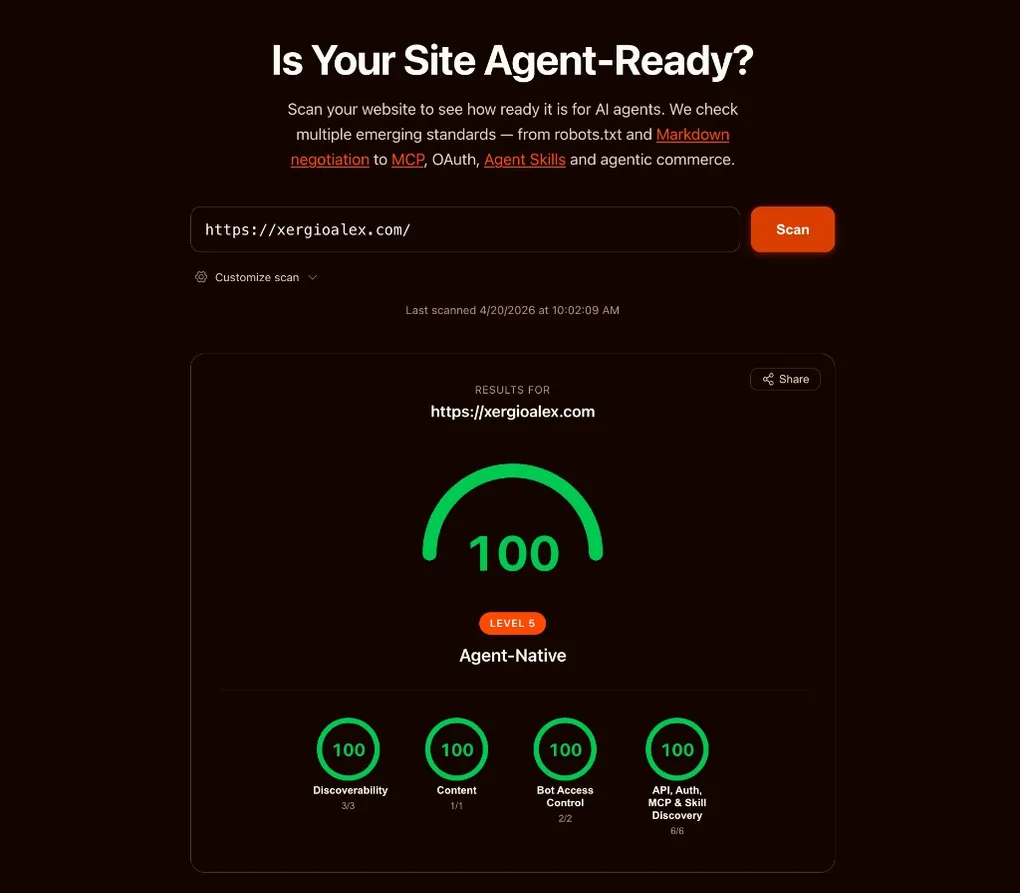
Stack up the eight artifacts, two middleware paths, and the WebMCP bridge. Any AI agent hitting xergioalex.com sees, in order:
- An HTML response with a
Link: </.well-known/api-catalog>; rel="api-catalog"header. - An HTML body whose markdown twin is one
Accept: text/markdownrequest (or a.mdURL) away. - A
robots.txtdeclaringContent-Signal: ai-train=yes, search=yes, ai-input=yes(with a middleware that hides that line for Lighthouse until it updates its parser). - An API catalog pointing at a real OpenAPI 3.1 spec and human-readable docs.
- An OAuth authorization-server metadata document — honest, annotated, structurally compliant.
- An OAuth protected-resource document — a valid self-reference.
- An MCP server card declaring the site supports
toolsandresources. - An agent-skills index with eight entries and SHA-256 digests, regenerated on every build against Cloudflare’s live bytes.
- A browser page that calls
navigator.modelContext.provideContext({ tools })on load with three read-only tools — or falls back toregisterToolone-by-one if the modern API isn’t available.
That’s a real protocol surface. None of this was possible a few weeks ago — none of the drafts above existed as shipped specs yet. The whole thing came together on top of a concern I’d been writing about for months: that AEO measurement was running years behind AEO optimization. Today, it isn’t.
The fifth category: agent-native commerce
I shipped the eight artifacts, watched the scorecard hit 100, and moved on. A few days later, isitagentready.com grew a fifth category: Commerce. Four new checks, four new SKILL.md files, one new question — can an AI agent pay your site?
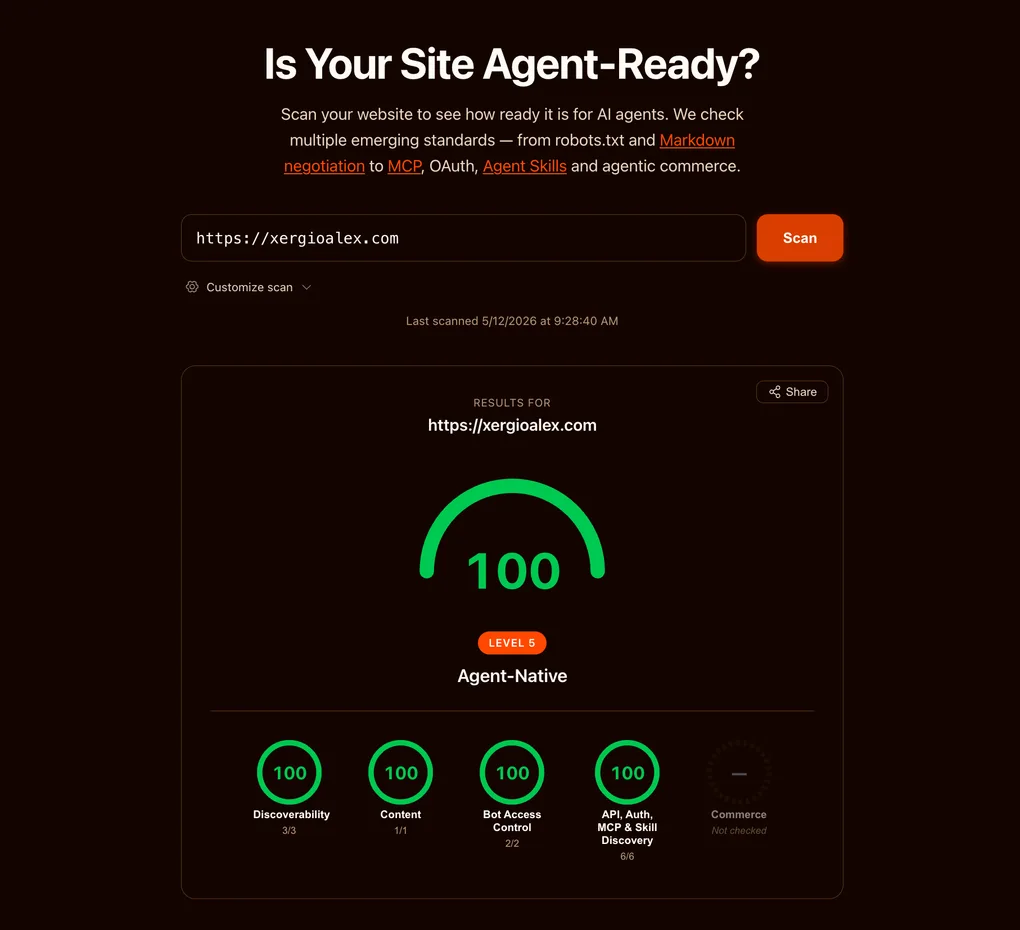
My score didn’t move. It still says 100. The new category sits at the end of the row, grayed out, labeled “not checked” — and each of its four sub-checks reports the same diagnosis: not a commerce site. That’s not a deduction. The scorecard treats Commerce as conditional: it grades it only if you’re a merchant, and a content site isn’t one. So, strictly, there’s nothing to do here.
But “nothing to do” and “nothing I could do” aren’t the same. I could ship the four artifacts anyway and turn that gray circle green. Here’s what each one is — and why I’m leaving it unchecked for this site.
The four commerce checks
1. x402 — HTTP 402, finally used for something. x402 is Coinbase’s revival of the long-dormant 402 Payment Required status code. You add a payment middleware (@x402/express, @x402/hono, or @x402/next) to your routes, configure a facilitator URL and a wallet address, and protected routes start answering with HTTP 402 plus machine-readable payment requirements. An agent reads the 402, pays through the facilitator, retries, gets the resource — no human in the loop. The scanner passes when checks.commerce.x402.status is pass. I unpack how this protocol works, and why it matters, in The Agent Economy — x402 is one of its central pieces.
2. MPP — payment hints inside your OpenAPI doc. Machine Payment Protocol reuses an artifact I already ship: /openapi.json. You attach an x-payment-info extension to every payable operation, declaring intent (charge or session), method (tempo, stripe, lightning, or card), and amount. Minimum shape:
"x-payment-info": { "intent": "charge", "method": "stripe", "amount": 2999 }There’s an SDK — mppx for TypeScript, pympp for Python — and middleware for Hono, Express, Next.js, and Elysia. The scanner passes when /openapi.json returns 200 and at least one operation carries a valid x-payment-info.
3. UCP — a commerce profile at /.well-known/ucp. Universal Commerce Protocol wants a JSON document at /.well-known/ucp with four required keys — protocol_version, services, capabilities, endpoints — and any spec URLs or schemas it references have to actually resolve. The scanner passes when checks.commerce.ucp.status is pass.
4. ACP — discovery metadata at /.well-known/acp.json. Agentic Commerce Protocol wants a discovery document at the origin root: protocol.name equal to "acp", a protocol.version, an absolute api_base_url, a non-empty transports array, and a non-empty capabilities.services array. Minimum shape:
{
  "protocol": { "name": "acp", "version": "1.0" },
  "api_base_url": "https://api.example.com",
  "transports": ["http"],
  "capabilities": { "services": ["payment"] }
}
By the standards of this post, that’s an afternoon: two static JSON files under .well-known/, one extension block in a file I already serve, one middleware. The cost isn’t the work — it’s what each document claims.
Those four documents have something in common: the existence of each one is a declaration that the site is a merchant — they only make sense if you actually sell something. Serving /.well-known/acp.json announces “I’m an agentic-commerce merchant; here’s my API base URL”; standing up x402 points at a real wallet ready to charge. And there’s no _comment that rescues it: “ACP merchant document, but the site isn’t a merchant” isn’t an honest caveat — it’s a contradiction in the same breath. This whole post has one recurring lesson, honesty beats theatre, and the Commerce category is where it stops being a tidy aside and becomes the entire decision: the honest answer here isn’t 100 — it’s not applicable.
And that’s what makes this fifth category different: the scorecard treats it as conditional, not mandatory. Not checked isn’t failed — it’s the tool acknowledging that “missing” and “doesn’t apply” aren’t the same thing. Few measurement systems make that distinction; most read every empty box as an outstanding debt. This one makes it, and that speaks well of it. The day xergioalex.com sells something — a paid course, a metered API tier, sponsored access to a tool — these four artifacts flip from theatre to truth and I’ll ship whichever ones fit. Until then, the agent-ready state of a content site is exactly what the screenshot shows: four categories maxed, one left blank on purpose — and that is the complete answer, not a partial one.
The web’s number-one reader
This whole chapter — the eight artifacts, the scorecard at 100 — is a site catching up to a change that already happened: the web’s number-one reader is barely a person with a browser anymore. It’s an agent. It doesn’t skim ten results or click a blue link — it asks, reads whatever it finds, assembles an answer, and hands it to someone who will never see your page. The earlier chapters in this series have the numbers behind that: search traffic eroding, sites that lost almost all of their organic. That shift is already here; the scorecard just put a number on it.
And the good news is that catching up is cheap. The foundations for an agent to read you well are a handful of text files and two lines of config — an afternoon’s work. If you want to start on your own site, the SKILL.md files at isitagentready.com/.well-known/agent-skills/ are the best starting point, and the .well-known/ field guide opens each document one by one: what it is, why it exists, what the minimum valid version looks like.
Don’t fixate on the number itself. isitagentready.com is one team’s yardstick, and the definitions move: this one grew a category mid-series, Lighthouse will rewrite its parser at some point, tomorrow another tool ships with another rubric. Today’s 100 could be an 80 a year from now without my touching a line. What lasts isn’t the score — it’s the files underneath, tied to open standards and not to the tool that grades them. Even if every scorecard disappears tomorrow, they stay there doing their job for any agent that respects the standards.
The expensive option is the other one: staying illegible while the ground moves. It doesn’t feel like a drop — it feels like a site that slowly stops showing up in the answers, with no one telling you. The era of agents won’t wait for you to be ready. I’d rather be on the side that already speaks its language.
I’ll keep building.
Resources
- Introducing the Agent Readiness score
- isitagentready.com
- RFC 8288 — Link headers
- RFC 9727 — API Catalog
- RFC 9728 — OAuth Protected Resource Metadata
- RFC 8414 — OAuth Authorization Server Metadata
- RFC 9309 — Robots Exclusion Protocol
- Content Signals draft (IETF)
- contentsignals.org
- Cloudflare Agent Skills Discovery RFC
- MCP Server Card — SEP-1649 / PR #2127
- WebMCP
- Cloudflare Pages
_headersdocs - x402 — agent-native HTTP payments
- x402 on GitHub (Coinbase)
- MPP — Machine Payment Protocol
- UCP — Universal Commerce Protocol
- ACP — Agentic Commerce Protocol

Sergio Alexander Florez Galeano
CTO & Co-founder at DailyBot
Colombian software engineer and entrepreneur (DailyBot, YC S21). I write about AI agents, developer tools, startups, and the craft of software engineering — and I build this site in the open at XergioAleX.com.
Stay in the loop
Get notified when I publish something new. No spam, unsubscribe anytime.
No spam. Unsubscribe anytime.