BSolutions: Managing Multiple Database Engines with Django and Docker
In Advanced Databases class, the professor asks a question that sounds almost absurd at first: what if a single application had to talk to ten different database engines simultaneously? Not ten tables in one database. Ten completely different databases — SQL and NoSQL, relational and document-based, graph and key-value — all connected to one central application, all running at the same time.
The challenge lands somewhere between exciting and overwhelming. Most projects you work on use one database. Maybe two if you’re using Redis for caching alongside PostgreSQL. But ten? And not ten of the same kind — ten fundamentally different systems, each with their own paradigm, their own wire protocol, their own strengths?
That’s the premise of BSolutions, my Advanced Databases university project. And the more I dig into it, the more I realize this isn’t just an academic exercise — it’s a real problem that large-scale systems face. Data migration between engines. Polyglot persistence, where different parts of your application use whichever database fits best. Research environments that need to benchmark engines side by side. The ability to connect a project to N databases through microservices and Docker containers is genuinely useful. I’m building the proof of concept here.
The architecture: one center, ten satellites
The core idea is simple to describe and interesting to implement. A central Python container running Django sits at the middle of the system. Around it, ten database containers — each isolated, each independent, each connected. The Django application can write to and read from any of them.
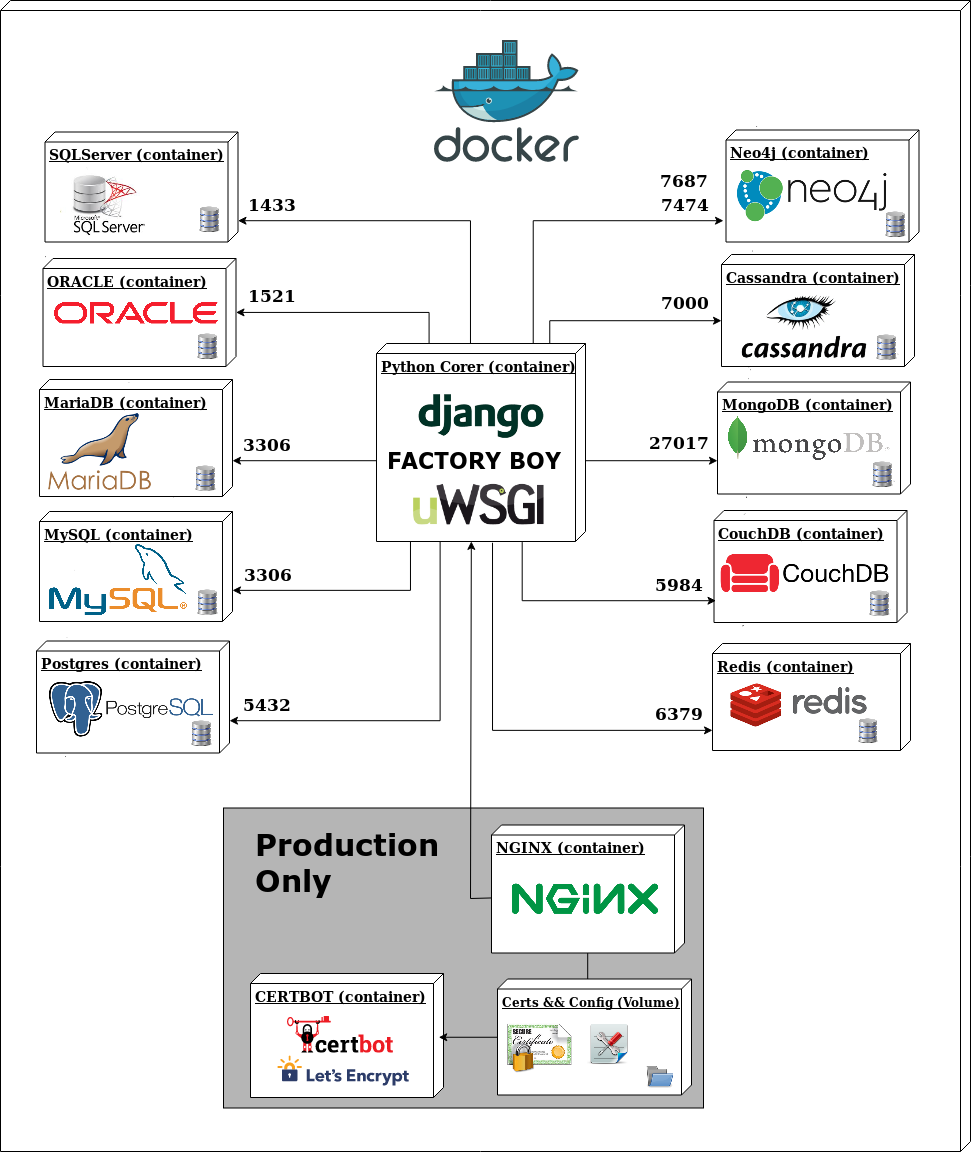
The diagram makes the topology clear. The Python Core container — Django, Factory Boy for test data generation, uWSGI as the application server — is the single point of contact. Below it, two clusters of five databases each: SQL engines on one side, NoSQL on the other. Above it, the production infrastructure: Nginx as reverse proxy, Certbot for Let’s Encrypt SSL, volumes for certificates and config.
Supporting services round out the stack: Celery Worker and Celery Beat for async task processing, Flower for monitoring those tasks, and PgAdmin for database management.
Every component runs in its own container. Every container is orchestrated with Docker Compose. The whole thing starts with a single command.
The SQL side: five relational databases
SQL databases share a common language and a common paradigm — tables, rows, columns, relationships. But they’re not interchangeable. Each of the five SQL engines in this stack has a reason to be here.
PostgreSQL (port 5432)
PostgreSQL is the primary database in this project. It’s the most capable of the five — full ACID compliance, excellent support for complex queries, JSON storage, full-text search, window functions, and a decades-long reputation for correctness. Django has first-class PostgreSQL support, including PostgreSQL-specific field types that don’t exist elsewhere.
For a project demonstrating multi-database capability, PostgreSQL is the natural anchor. It’s what I’d use in production for the main application data, and it’s what Django’s ORM is most comfortable with.
MySQL (port 3306)
MySQL is the most widely deployed relational database in the world — it powers enormous portions of the internet. Including it here makes sense both for comparison and for compatibility. MySQL’s query optimizer behaves differently from PostgreSQL’s. Its handling of transactions, strict mode behavior, and character encoding edge cases are all worth understanding.
The practical reality is that many projects inherit MySQL databases. Being able to connect Django to MySQL and route queries appropriately means being able to work with those systems without a full migration.
MariaDB (port 3306)
MariaDB is a fork of MySQL, created after Oracle acquired Sun Microsystems. It maintains near-identical compatibility with MySQL at the protocol level — it uses the same port, the same client libraries, the same Django configuration. But under the hood, the storage engines differ. MariaDB introduces features and performance improvements that don’t exist in MySQL.
Having both in the stack lets me explore where they diverge despite looking nearly identical from Django’s perspective.
Oracle (port 1521)
Oracle Database is the dominant enterprise relational database. It’s in banking systems, healthcare infrastructure, government databases, telecom platforms — anywhere that enormous scale and decades of vendor support matter more than license costs.
It’s also notoriously difficult to configure, especially in a containerized environment. Including Oracle in this project is partly a learning exercise: understanding how a Django application connects to Oracle, what packages are required (cx_Oracle, the Oracle Instant Client), and what the connection configuration looks like. This is knowledge you need the first time a client hands you an Oracle system to integrate with.
SQL Server (port 1433)
Microsoft’s SQL Server completes the enterprise SQL picture. If Oracle owns the traditional enterprise database market, SQL Server owns the Microsoft ecosystem — .NET applications, Azure deployments, Windows Server environments. The pyodbc and django-pyodbc-azure packages bridge Django to SQL Server through ODBC.
Having SQL Server in the stack means I can demonstrate that Django’s ORM abstracts across the Microsoft ecosystem as readily as it does across open-source databases.
The NoSQL side: five non-relational databases
NoSQL is not a single thing. That’s the important lesson. The five NoSQL databases in this project represent five genuinely different approaches to storing data, each designed with a different problem in mind.
MongoDB (port 27017)
MongoDB is the document database — it stores data as JSON-like documents (BSON, actually), which means hierarchical, nested, schema-flexible data structures. No joins, no rigid table definitions. A User document can contain an embedded array of addresses, an embedded object for preferences, and everything lives together in one document.
This is the most popular NoSQL database, and for good reason. For applications where your data is naturally document-shaped — content management, catalogs, user profiles — MongoDB’s model fits better than a relational schema. The djongo adapter lets Django’s ORM work with MongoDB, though with some limitations compared to a native relational database.
Redis (port 6379)
Redis is a key-value store, but calling it “just” a key-value store undersells it. Redis is an in-memory data structure server. It supports strings, hashes, lists, sets, sorted sets, streams, and more — all in memory, all extremely fast.
In this architecture, Redis serves two roles: as a direct database endpoint that Django can query, and as the backend for Celery’s task queue. The Celery Worker and Celery Beat services both depend on Redis for storing task state and scheduling. Redis’s speed makes it ideal for session storage, caching, real-time leaderboards, rate limiting — anything where latency matters more than durability. Django’s django-redis package handles the connection.
CouchDB (port 5984)
CouchDB is a document database like MongoDB, but designed around different priorities. Where MongoDB optimizes for writes and rich queries, CouchDB optimizes for distributed replication and offline-first use cases. Its replication protocol is built into the core — CouchDB can sync between nodes, including bidirectional sync, handling conflicts with a deterministic merge strategy.
CouchDB also exposes its entire API over HTTP with JSON. You can interact with it through a browser using its Fauxton web interface, or through any HTTP client. That makes it uniquely approachable. Including CouchDB demonstrates that the document database category isn’t monolithic — MongoDB and CouchDB are both document stores with fundamentally different architectural philosophies.
Cassandra (port 7000)
Apache Cassandra is a wide-column database designed for massive scale and high availability. Originally developed at Facebook, it’s built for write-heavy workloads distributed across many nodes with no single point of failure. Cassandra uses consistent hashing for data distribution and offers tunable consistency — you choose, per query, whether you want eventual consistency (faster) or strong consistency (slower but guaranteed).
The data model is different from relational databases: tables have a partition key that determines which node holds the data, and queries are designed around that partitioning. Ad-hoc querying is limited compared to SQL — you design your tables around your query patterns, not the other way around. Cassandra is in this project because understanding its model is essential for any system that deals with time-series data, IoT streams, or distributed write throughput at scale.
Neo4j (ports 7687/7474)
Neo4j is a graph database. It stores data as nodes and relationships — not tables and foreign keys, not documents, not key-value pairs. A node represents an entity (a person, a product, a location). A relationship connects two nodes and can carry properties of its own (a person LIVES_IN a city, with a “since” property; a person PURCHASED a product, with a “timestamp” property).
The query language is Cypher, which reads almost like drawing a diagram: MATCH (p:Person)-[:FOLLOWS]->(other:Person) WHERE p.name = 'Alice' RETURN other.name. Graph databases excel at queries that would require expensive recursive joins in SQL — social network traversal, fraud detection, recommendation engines, knowledge graphs.
Port 7474 exposes the Neo4j Browser web interface. Port 7687 is the Bolt protocol port that Django (via django-neomodel or py2neo) uses for application queries. Having both available means I can visually explore the graph while the application connects programmatically.
How Docker makes this possible
Ten database containers simultaneously. Each database engine has its own dependencies, its own runtime, its own system libraries. Without Docker, this would require either a dedicated machine for each database or an incredibly complex local setup that would be nearly impossible to reproduce on another machine.
Docker solves this completely. Each database runs in an isolated container, with its own filesystem, its own network stack, its own process space. They don’t interfere with each other. Starting the entire stack — all ten databases, the Django application, Nginx, Celery, Flower — is a single command:
cd docker/local && bash docker.sh upThe docker.sh shell script wraps Docker Compose commands and handles the orchestration logic. It’s responsible for building images, starting services in the right order, and managing the lifecycle of the entire stack. Having this automation means anyone who clones the repository can be running the full multi-database environment in minutes, regardless of what they have installed locally.
The Docker Compose configuration defines the network that all containers share. The Django container can reach postgres:5432, mysql:3306, mongodb:27017, and every other database by container name — Docker’s internal DNS handles resolution automatically. No hardcoded IP addresses. No host-level port conflicts between engines sharing the same default port (MySQL and MariaDB both use 3306, but in separate containers with separate internal namespaces).
How Django handles multiple databases
Django has built-in support for multiple databases, but it takes some configuration to wire up correctly. The key is the DATABASES dictionary in settings.py, which defines connection parameters for each named database:
DATABASES = {
    'default': {
        'ENGINE': 'django.db.backends.postgresql',
        'NAME': 'bsolutions',
        'HOST': 'postgres',
        'PORT': '5432',
        # ...
    },
    'mysql_db': {
        'ENGINE': 'django.db.backends.mysql',
        'NAME': 'bsolutions',
        'HOST': 'mysql',
        'PORT': '3306',
        # ...
    },
    'oracle_db': {
        'ENGINE': 'django.db.backends.oracle',
        'NAME': 'bsolutions',
        'HOST': 'oracle',
        'PORT': '1521',
        # ...
    },
    # ... nine more entries
}
Each key in DATABASES is a named connection. The 'default' connection is what Django uses unless you specify otherwise. To route a particular model to a particular database, Django uses Database Routers — Python classes that implement a simple interface:
class PostgreSQLRouter:
    def db_for_read(self, model, **hints):
        if model._meta.app_label == 'postgres_app':
            return 'default'
        return None

    def db_for_write(self, model, **hints):
        if model._meta.app_label == 'postgres_app':
            return 'default'
        return None

    def allow_migrate(self, db, app_label, model_name=None, **hints):
        return app_label == 'postgres_app'
The router’s db_for_read and db_for_write methods return the name of the database to use for a given model. If the router returns None, Django falls through to the next router in the chain. The DATABASE_ROUTERS setting in settings.py lists the routers in priority order.
For manual query routing — when you need to send a specific query to a specific database — Django’s ORM supports an using() method:
# Query PostgreSQL
users = User.objects.using('default').all()

# Query MySQL
products = Product.objects.using('mysql_db').all()

# Write to Oracle
order = Order(customer=customer, total=total)
order.save(using='oracle_db')
Factory Boy generates realistic test data that populates all ten databases during setup, so the application has meaningful data to query across every engine from the first run.
Supporting infrastructure
The architecture isn’t just databases and Django. Several supporting services make the whole system production-ready.
Nginx acts as the reverse proxy. Requests come into Nginx on ports 80 and 443. Nginx terminates SSL and forwards clean HTTP to uWSGI, which serves the Django application. This is the standard production deployment pattern for Django — Django itself doesn’t handle SSL or serve static files efficiently.
Certbot handles Let’s Encrypt SSL certificate provisioning and renewal. The certificates and Nginx configuration live in a shared Docker volume — Certbot writes the certs, Nginx reads them.
Celery Worker processes asynchronous tasks. Any operation that shouldn’t block a web request — sending emails, generating reports, processing data across databases — gets handed to Celery. The Worker pulls tasks from the Redis queue and executes them.
Celery Beat is the scheduler. It triggers periodic tasks — database health checks, automated reports, cleanup jobs — according to a configured schedule.
Flower is Celery’s monitoring dashboard. It runs as a web service and shows real-time information about task queues, worker status, and task history. When something goes wrong with async processing, Flower is where I look first.
PgAdmin provides a web-based PostgreSQL management interface. While the Django application connects through the ORM, PgAdmin gives direct access to the PostgreSQL database — browsing tables, running queries, checking query plans, managing roles.
What this project teaches
The practical outcome of BSolutions is a working demonstration that one application can simultaneously manage databases from five different database paradigms: relational (PostgreSQL, MySQL, MariaDB, Oracle, SQL Server), document (MongoDB, CouchDB), key-value (Redis), wide-column (Cassandra), and graph (Neo4j).
But the deeper lesson is about what Docker makes possible. This stack — ten databases, a full Django application, production-grade infrastructure — is completely reproducible. Anyone with Docker installed can clone the repository and run the exact same environment. No database installation, no system configuration, no version conflicts. The containerized architecture is portable by design.
This matters beyond the academic context. Real-world systems increasingly use polyglot persistence — choosing the database that fits each part of the application rather than forcing everything into a single engine. A social feature uses a graph database. User sessions use Redis. The main transactional data uses PostgreSQL. Documents and media metadata use MongoDB. And a Django application, with the right configuration and routing, can talk to all of them.
The 238 commits in this repository represent the iteration it takes to get a stack this complex working reliably. Configuration issues, library compatibility problems, connection pooling, authentication across different database protocols — each database brings its own quirks. Working through those quirks is the education.
Get started
The repository is public and ready to run:
git clone https://github.com/xergioalex/django-multiple-databases-engines
cd django-multiple-databases-engines/docker/local
bash docker.sh up
That’s it. Docker pulls the images, starts the containers, and brings up the full ten-database stack.
For the production setup, Docker Machine and Docker Swarm handle orchestration across servers. The docker.sh script supports different environments — local development and production deployment use separate Compose configurations.
Let’s keep building.
Resources
- BSolutions — Django Multiple Databases (GitHub)
- Django multiple databases documentation
- Docker Introduction — my talk on Docker and microservice architecture
- Docker Introductory Workshop — hands-on deep dive at Rocka Labs
- Factory Boy — test fixtures for Python
- Flower — Celery monitoring