
People who know me know I love Astro — I’ve written about why. So when they dropped this on X — “4… 3… 2… 1…” — I was already watching.

Astro 6 launched on March 10, 2026. Shortly after, this site was already running it. Not because I’m reckless — because I was ready. Every dependency current, codebase on the latest APIs, Vite warnings already cleaned up. And Astro’s migration tooling is solid enough that I trusted the process. When you’re on top of things, a major jump is just one more step.
Oh — and if you’re reading this, you’re already seeing the results. This site is running Astro 6’s experimental Rust compiler right now. The dev server starts in under 3 seconds. But let’s not get ahead of ourselves.
The Strategy: Minor First, Major Second
I didn’t jump from Astro 5 to 6 in one shot. Before the major upgrade, I ran all the minor and patch updates first — 8 packages total. The idea was simple: isolate the variables. If something breaks after the major upgrade, you know it’s from the major change, not from some sneaky patch bump that happened to ship a bug.
That first round upgraded things like @astrojs/check, @astrojs/rss, @astrojs/sitemap, @biomejs/biome, svelte, and happy-dom. All patch and minor bumps. All safe.
I also cleaned up a Vite warning I’d been ignoring — circular dependencies in Svelte. Everything green. Tests passing. Build clean. PR #79 merged. Ground cleared.
The Actual Migration
With the minors out of the way, the major jump was straightforward. One command:
npx @astrojs/upgradeThree packages needed major bumps:
| Package | Before | After |
|---|---|---|
| astro | 5.18.1 | 6.0.3 |
| @astrojs/svelte | 7.2.5 | 8.0.0 |
| @astrojs/mdx | 4.3.14 | 5.0.0 |
The CLI updated package.json, ran npm install, resolved all peer dependencies. Clean. No conflicts. And then Houston showed up:
╭─────╮  Houston:
│ ◠ ◡ ◠  Wonderful. Everything is on the latest and greatest.
╰─────╯
╭─────╮  Houston:
│ ◠ ◡ ◠  Take it easy, astronaut!
╰─────╯
If you’ve never used npx @astrojs/upgrade, that little ASCII face typing out its message character by character is one of those details that makes you smile. Astro’s CLI has personality.
Then I ran npm run build and held my breath. You always do, right? Doesn’t matter how confident you are — that first build after a major upgrade hits different.
What Broke (And What Didn’t)
The build completed. 235 pages generated. But then — errors in the console:
The collection "tags" does not exist or is empty.Ten times. My tags collection — the one that defines tag metadata like tier and display order — had gone invisible.
I stared at it for a second. The collection was right there, the files were right there. What changed?
Fix 1: Collections Now Need Explicit Loaders
Turns out, in Astro 5, if you defined a collection without a loader, it silently used a file-based fallback. It just worked. In Astro 6, that magic is gone. Every collection must declare how its content is loaded. Makes sense — explicit is better than implicit — but if you didn’t know about the change, it looks like your content vanished.
My content.config.ts had this:
const tags = defineCollection({
  schema: z.object({
    name: z.string(),
    tier: z.enum(['primary', 'secondary', 'subtopic']).default('primary'),
    order: z.number().default(0),
  }),
});
The fix was one line:
const tags = defineCollection({
  loader: glob({ base: './src/content/tags', pattern: '**/*.md' }),
  schema: z.object({
    name: z.string(),
    tier: z.enum(['primary', 'secondary', 'subtopic']).default('primary'),
    order: z.number().default(0),
  }),
});
Once I understood what Astro 6 was asking for, it was obvious. But that moment of “wait, where did my tags go?” — that’s the kind of thing that can eat an hour if you don’t read the migration guide first.
Fix 2: Zod Moved
Astro 6 ships Zod 4 internally and deprecates the old import path:
// Before (Astro 5)
import { defineCollection, z } from 'astro:content';

// After (Astro 6)
import { defineCollection } from 'astro:content';
import { z } from 'astro/zod';
The old way still works — for now. But the deprecation warning is loud enough that you’d rather fix it than ignore it.
What Didn’t Break
Honestly, I was bracing for more. Here’s what I expected might be problematic and wasn’t:
- Vite 7 — My
manualChunksconfig for Svelte? Worked without touching it. - Shiki 4 — I don’t use the
<Code>component, so nothing to worry about. - Content Layer API — Already using
glob()loaders for blog, series, and pages. No legacy migration. render()API — Already onrender(post)instead ofpost.render().- 170 unit tests — All passed. First run. Not one failure.
That last one felt good. You write tests hoping they’ll catch regressions, and then when a major version upgrade runs through all 170 of them and everything passes — that’s when you know the investment paid off.
Two fixes. That was the entire migration.
Cleaning Up the New Noise
Well — almost. I fired up the dev server and got greeted by a MaxListenersExceededWarning. Eleven listeners on the FSWatcher, limit of ten. Classic Node.js complaint. Astro 6’s redesigned dev server spawns more file watchers than before — not a memory leak, just the new architecture being chattier. I bumped the default in astro.config.mjs and moved on:
import EventEmitter from 'node:events';
EventEmitter.defaultMaxListeners = 20;
Then the build threw two Rollup warnings about “unused” imports — Svelte’s fade transition and some internal Astro helpers. Both false positives. The imports are used; Rollup just can’t see them after compilation. A quick onwarn filter shut them up.
None of this was blocking. But I’m the kind of person who can’t ignore warnings in the terminal. If the log is clean, you notice when something actually breaks.
After confirming everything was green — Biome, TypeScript, build, all 170 tests — I pushed to production. No staging, no canary deploy. When every check passes, there’s not much to overthink.
What’s New in Astro 6
The migration was the easy part. Now for what actually got me excited.
Astro 6 ships a lot. The dev server got rebuilt on top of Vite’s Environment API — dev and production now run the same runtime, which is a big deal for Cloudflare users tired of “works on my machine” surprises. There’s a new Fonts API that handles downloading, preloading, and fallback generation — the kind of thing you always end up doing by hand and never getting quite right. Live Content Collections let you fetch data at request time instead of build time, same API, no rebuild pipeline — I don’t need it for a static blog, but it opens Astro to use cases it couldn’t touch before. And Content Security Policy became a first-class config — the most-upvoted request in Astro’s history, shipped with a single flag.
All solid. But the feature that actually made me stop and run benchmarks was the Rust compiler.
The Rust Compiler: Not Placebo
Remember that Rust compiler I mentioned at the top? Here’s how that happened.
After the migration, everything felt faster. Dev server startup, page navigation, builds. I thought it was the excitement of a fresh major version. Then I enabled the experimental Rust compiler — and realized the speed was real.
Astro 6 ships a new Rust-based .astro compiler, the successor to the original Go compiler. Enabling it is two steps:
npm install @astrojs/compiler-rsexport default defineConfig({
experimental: {
rustCompiler: true,
},
});I ran the build. 235 pages. All 170 tests passed. Nothing broke. So I decided to benchmark it properly — three runs each, Rust vs Go.
Build times (235 pages):
| Rust | Go | Difference | |
|---|---|---|---|
| Cold build | 17.6s | 18.3s | -4% |
| Warm build (avg) | 14.5s | 15.6s | -7% |
Modest for builds — the bottleneck is Vite and page generation, not .astro compilation. But then I benchmarked the dev server.
Dev server startup:
| Rust | Go | |
|---|---|---|
astro ready in | 2,779ms | 11,201ms |
Four times faster. The Go compiler took 11 seconds to start the dev server. The Rust compiler? Under 3.
First request (cold, no cache):
| Page | Rust | Go |
|---|---|---|
/ (homepage) | 0.07s | 2.64s |
/blog | 0.23s | 0.20s |
/about | 0.06s | 0.08s |
The homepage — the most component-heavy page on the site — compiled 36x faster on the first cold request. Once Vite caches the output, both serve identically (~10-30ms). The difference is entirely in how fast each compiler processes .astro files for the first time.
So that “everything feels faster” perception? Not placebo. Not hype. It was the Rust compiler doing its job — turning .astro files into JavaScript in milliseconds instead of seconds. Every time you restart astro dev, every time you open a page for the first time, the difference is there.
The compiler is stricter than the Go version — it won’t auto-correct invalid HTML like unclosed tags. In my case, not an issue. But worth knowing if your templates are loose.
And then came the surprise.
I deployed to production, opened the site, and saw this:
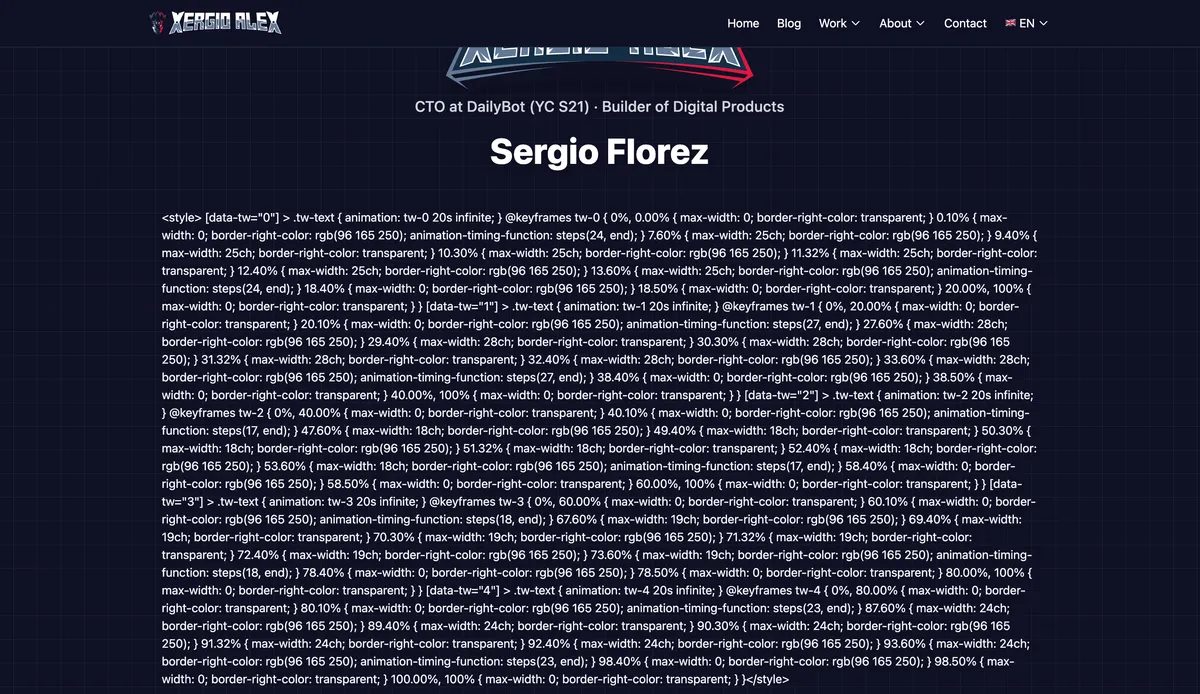
The entire CSS for my typewriter animation — hundreds of lines of keyframes — rendered as plain text on the homepage. Right there, in front of visitors. The <style> tag had been escaped to <style>.
The cause? I was injecting dynamic CSS with <Fragment set:html={...}> containing a <style> tag. The Go compiler handled it fine. The Rust compiler escaped it. Locally in dev mode? Worked perfectly. Production build? Broken.
The fix was one line:
<!-- Before (Go compiler handled this) -->
<Fragment set:html={`<style>${dynamicCSS}</style>`} />

<!-- After (works with both compilers) -->
<style is:inline set:html={dynamicCSS}></style>
Fifteen minutes between deploy and the fix. Not my proudest moment — but exactly the kind of thing you discover only in production with an experimental compiler. The “stricter” part of “stricter than the Go version” is real. Next time I’ll be more careful — since I have Cloudflare Pages, I’ll preview it on a branch first before shipping straight to production.
So yes — that’s what’s running this site right now. The dev server starts in 3 seconds instead of 11. Pages compile before I can blink. And this is the experimental version. When they make it the default, I expect even more.
Was It Worth the Wait?
Astro 6 didn’t have the kind of hype where the JavaScript community implodes for a week. But there was real anticipation — nine betas over almost two months, Cloudflare acquiring the company in January, CSP as the most-upvoted feature request in Astro’s history. People were watching.
And the response has been positive. Some friction around breaking changes — Node 22+ required, legacy collections gone — but nothing unfair for a major version. The Cloudflare Workers crowd is especially happy now that dev and production actually run the same runtime.
So — was it worth it?
I think so. Not because of one feature that rewrites the rules. But because the whole release is about optimization. If Astro was already fast, v6 turned it into something else. The Rust compiler, Vite 7, the redesigned dev server — every layer got faster. The migration was almost boring in how smooth it went. The new features solve real problems instead of chasing trends. And the philosophy I liked about Astro still holds: they didn’t break things for sport. Every change has a reason.
The Cloudflare acquisition clearly accelerated this. Real backing means the team can invest in ambitious things — the Rust compiler, the Environment API — without worrying about runway. Astro has momentum now. Not just community enthusiasm, but engineering resources behind it. Microsoft, Porsche, IKEA, The Guardian, NordVPN — these aren’t hobby projects. This isn’t niche anymore.
For anyone on Astro 5 wondering whether to upgrade: do it. Get your dependencies up to date, run the CLI, and push. You’ll be done before lunch. The Rust compiler — save that for last. It’s experimental, so take it slow, and if everything checks out, go for it. It’s worth it. Your dev server will thank you.
Resources
- Astro 6.0 Release Blog — Full feature overview
- Astro 6 Upgrade Guide — Step-by-step migration
- Zod 4 Changelog — Schema library changes
- Vite 7 Migration Guide — Bundler changes
- XergioAleX.com Repository — The source code
Let’s keep building.

Stay in the loop
Get notified when I publish something new. No spam, unsubscribe anytime.
No spam. Unsubscribe anytime.