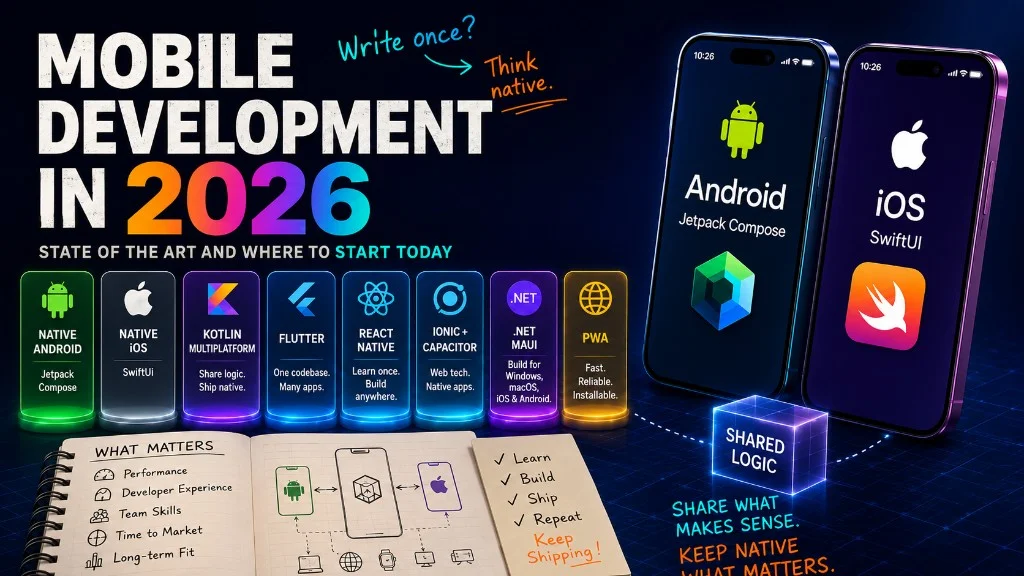
As a full stack developer, I’ve always tried to learn a bit of everything: backend, frontend, infrastructure, DevOps. If there’s a new technology that catches my attention, I explore it. That’s how I work. But with mobile development the story has been different. I watch it from a distance — I see it, I respect it, sometimes I envy it — but I always end up on the other side, building APIs, interfaces, and infrastructure — systems that live on servers. Mobile was always that “someday” that never arrived.
Not because I hadn’t tried.
My history with mobile development
I remember my final university years — we’re talking around fifteen years ago — when I needed to build a mobile app for an entrepreneurship course. Android Studio didn’t exist yet; the official IDE was Eclipse with the ADT plugin, and it was too heavy for my humble laptop at the time. It wouldn’t start, or it would start and eat all the memory, or it would get stuck compiling in a loop that felt eternal.
Looking up screenshots from that era I found these gems — Eclipse Helios loading with the ADT plugin, the visual layout editor, and the emulator with its virtual physical keyboard. The flashbacks are immediate:
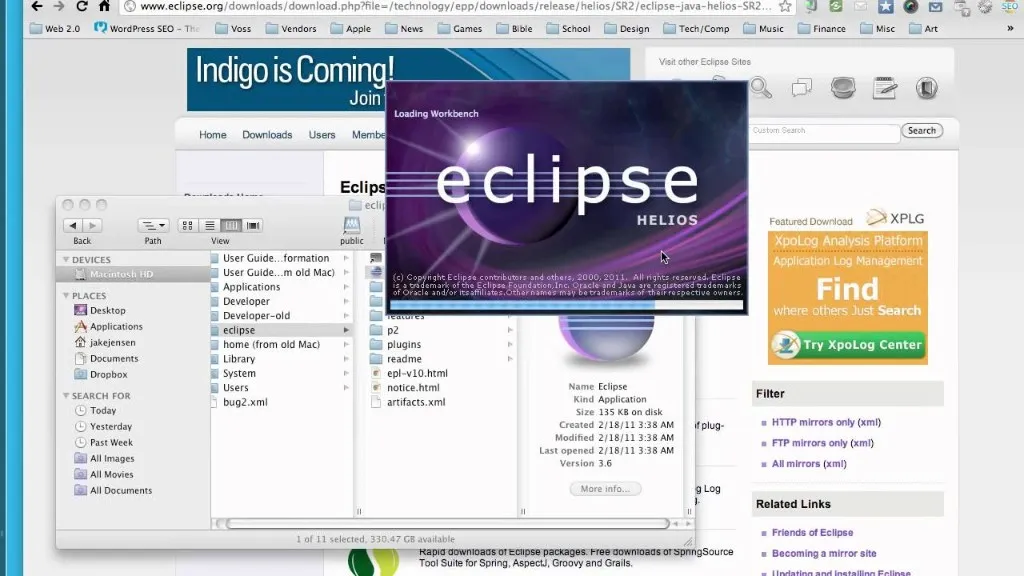
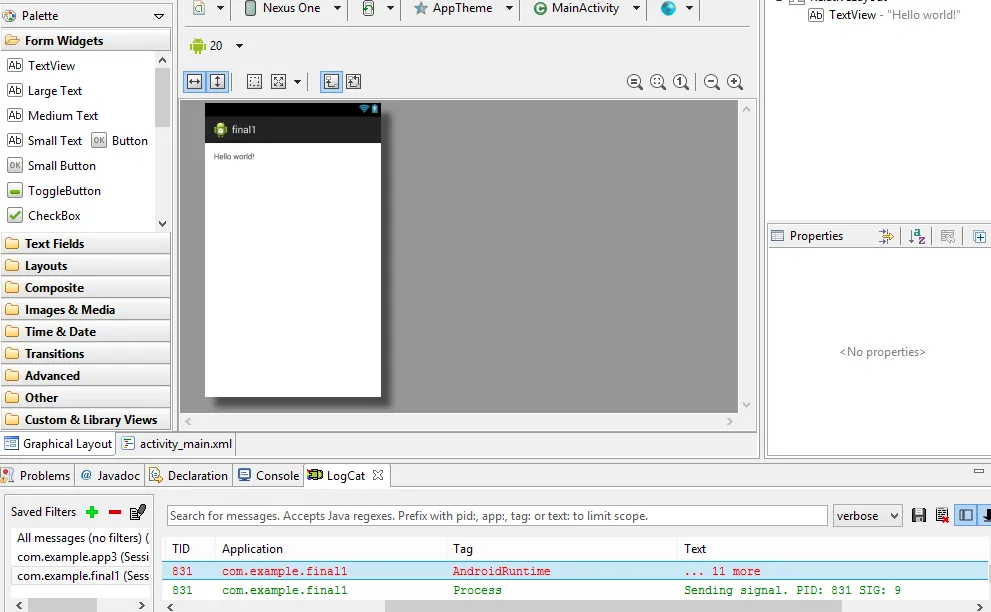
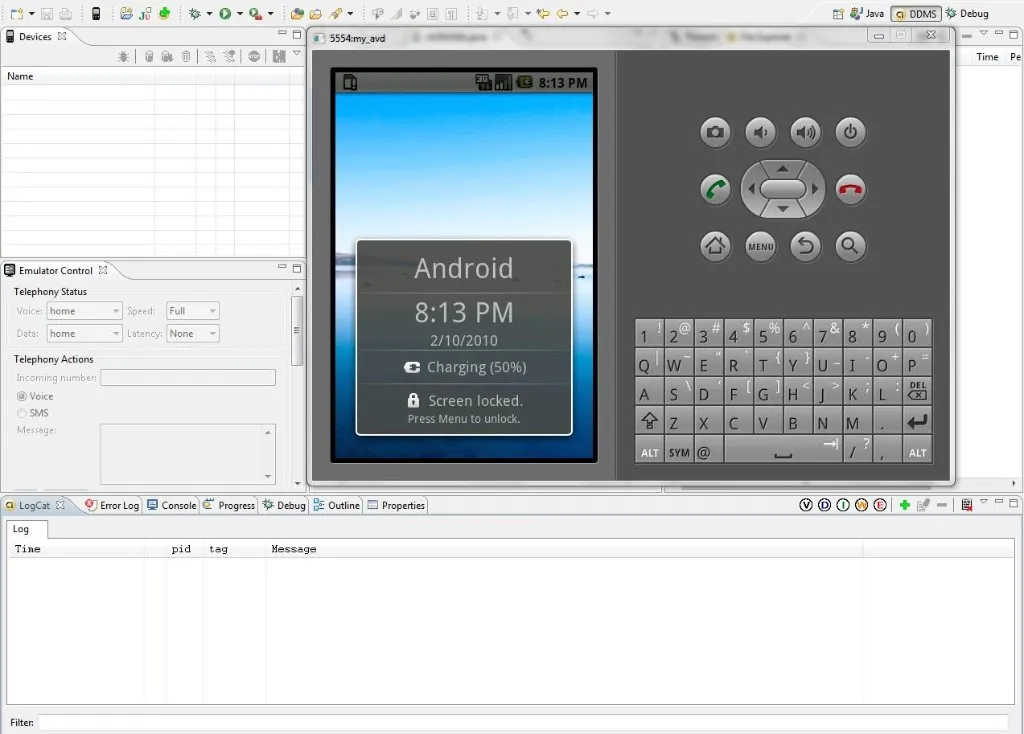
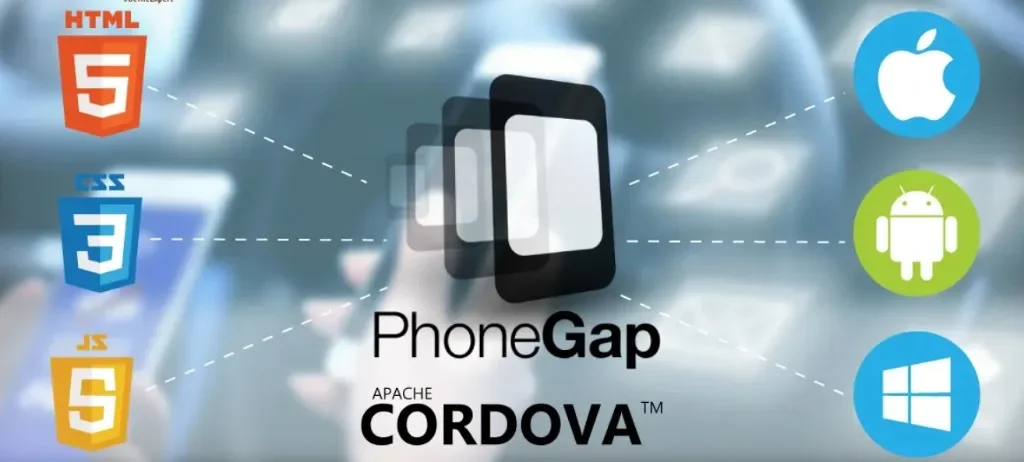
So I started looking for alternatives. PhoneGap — later Apache Cordova — opened the door to my first hybrid apps: the same web stack packaged inside a native shell, a route that actually made sense because on the laptop I had back then Eclipse + ADT + emulator never really worked.
For the university course, our team was Camilo, Miguel, and me. Camilo and Miguel are close friends from school; Miguel was practicing karate at the time. We staged a photo shoot and wrapped the material into a simple instructor-style app — a pocket reference to review and learn from the phone — and shipped it as KDoSensei. The MVP was plain and, by today’s standard, dated: we’re talking nearly fifteen years ago, before UIs were as polished as they are now; it still worked.
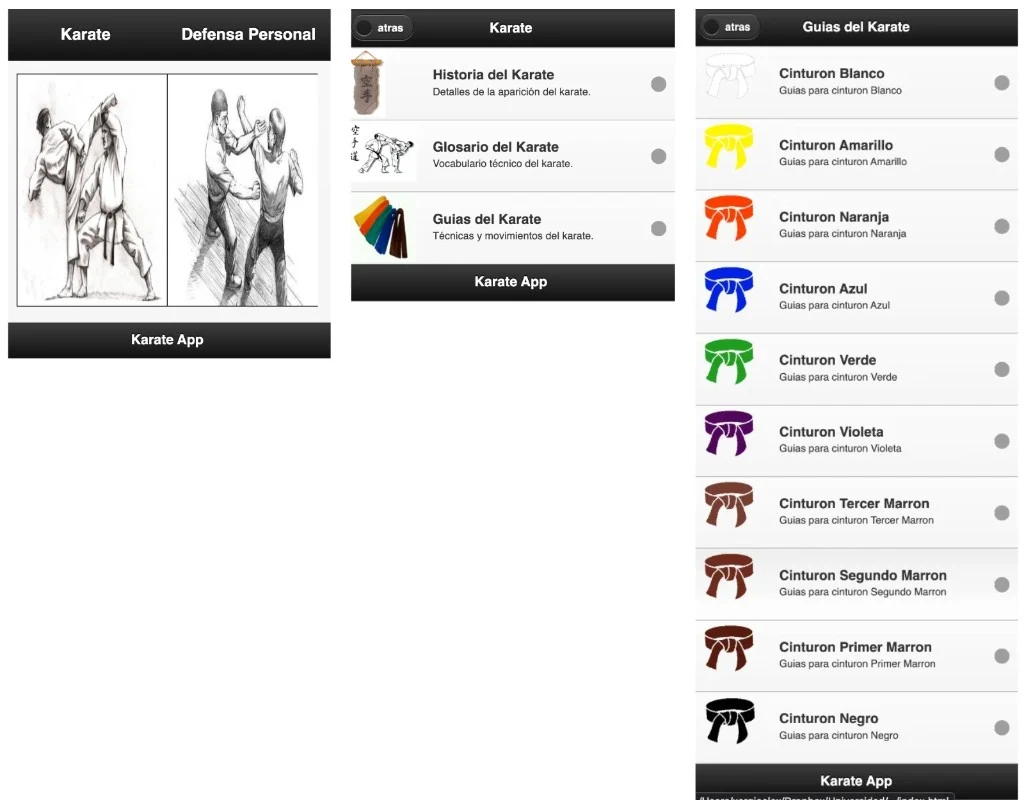

Years later I dug up my course files — source included — along with the original Android APKs. Those packages don’t run cleanly on today’s devices anymore — newer OS releases have mostly left them behind — but the web layer was worth saving. Hybrid apps like that are still, at heart, embedded web inside a native shell. I put that same frontend online as a static site on Cloudflare Pages at kdosensei.xergioalex.com, and collected the recovered files in the xergioalex/kdosensei repo — a time-machine snapshot of that semester, the team, and the hybrid tooling, kept intact instead of vanishing in some forgotten zip on an old drive.
I didn’t close the book there. Over the years I tried Ionic — same idea, better tooling, faster prototypes — Meteor bundled with Cordova (reactive and tempting until production felt fragile), and some experiments with React Native, closer to native but with its own friction. Each round taught me the ceiling of the last one.
The problem arrived when I needed more than screens and copy. When a project needed real access to camera, GPS, sensors, or push, hybrid showed visible seams: a slow bridge or an API that simply wasn’t there. Layer in animations or expect genuinely native UX and you still felt the web inside the shell; on modest hardware, performance fell apart fast. What “flew” in a desktop browser landed on a phone like a dressed-up web app — and users notice that gap.
After that, I walked away from mobile — more than once — and drifted back to what I already knew: APIs, servers, infrastructure, databases. The phone went back into the “someday” drawer.
It wasn’t the first time and it wasn’t the last. Every so often a new framework, an incredible demo, or a “build your first app in 30 minutes” tutorial would pull me back. But mobile demands so many artifacts — certificates, provisioning profiles, emulators, Gradle or Xcode configs, developer accounts — that the impulse would die before the first line of code. In frontend you open an HTML file and you’re running; in backend, three lines spin up a server; in mobile, before “Hello World” you’ve already cleared three setup wizards and a Gradle error that sends you to Stack Overflow. The barrier wasn’t intellectual. It was logistical. And logistics kills motivation faster than complexity.
This year I decided that was enough. Not because I have an urgent project — though there’s something there — but because I wanted to understand the current state of the art and find my happy path: the one that lets me build apps with real standards without fighting the ecosystem just to get started. Before writing a single line, I sat down to understand the landscape — not out of curiosity, but because I wanted to know what I was getting into before picking a tool.
The real problem isn’t choosing a framework
People arriving from web tend to focus on the least important thing first: “what framework should I use?” But the question worth asking comes before that: “what’s actually different about this domain?” The honest answer: quite a bit.
A web app runs inside the browser — a tab, available memory, a URL that anchors state. If the tab closes, the user decided so. On mobile, that predictability disappears: the operating system decides when your app runs, when it backgrounds, and when it kills the process to free memory — without warning. The screen can be destroyed and recreated at any moment, and when it comes back you rehydrate state from persistent storage, not from memory. That lifecycle ramifies through every architectural decision: where you store data so it survives, who rehydrates it, how much time you have to serialize before the OS pulls the plug.
Web has complexity too — backend or frontend — but the complexity is different: the runtime isn’t yours anymore, it’s the operating system’s. That said: the framework does matter, and it’s worth understanding the terrain before choosing.
The ecosystem, in four categories
Before naming each option, it helps to establish the categories. The mobile ecosystem organizes into four fundamental types:
Native — one platform, one language, full access to the OS APIs. Kotlin with Jetpack Compose on Android; Swift with SwiftUI on iOS. Maximum control, maximum platform lock-in: if you build native Android, your app only runs on Android, and reaching iOS means rewriting it in another language and another ecosystem.
Cross-platform with native UI — shared logic or shared UI, compiled to native. KMP and Flutter live here, though with fundamentally different philosophies. Both are “cross-platform,” but what that means for each is different.
Hybrid — web technologies running inside a native container. React Native maps JavaScript components to native views — technically not a classic hybrid, though it often gets grouped with them. Ionic/Capacitor is a truer hybrid: your HTML and CSS run in a WebView (a browser embedded inside the app).
Web / PWA — a website you can install on the home screen. No native compilation. Works well for content-first apps; hits its limits when you need deep device integration.
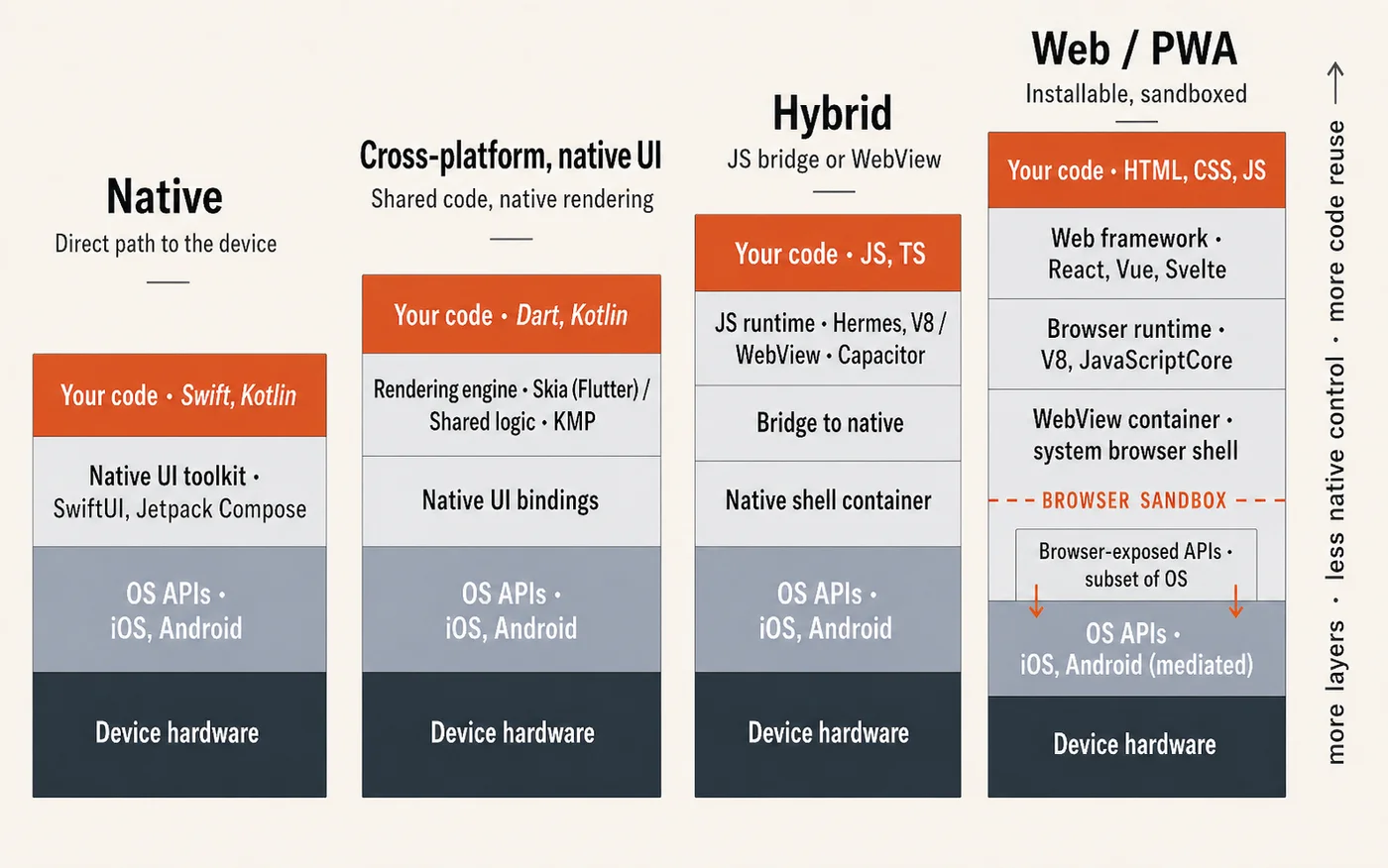
This classification will feel simple once we get into the details — and it is, a bit. The reality is that “cross-platform” is not a monolithic category. KMP and Flutter are two very different bets about what sharing code means, and that nuance matters more than it looks at first.
Each option, without decoration
Eight options: the ones worth considering in mobile development today, in 2026. One by one. What defines each, what it costs to use, and where it fits best.
Native Android — Kotlin + Jetpack Compose
You write Kotlin with Jetpack Compose. Your app is exactly what Google designed Android to run — Kotlin is, in Google’s own words, “the preferred language for Android app development.” The OS gives you direct access to all its APIs, animations feel native because they are, and nothing will surprise you in terms of compatibility. The cost is clear: it only runs on Android. If you ever need to reach iOS, you’re back at square one with a different language and a different stack.
Native iOS — Swift + SwiftUI
Same logic, Apple side. Swift since 2014, SwiftUI since 2019. By 2026, Swift is at 6.2 and SwiftUI ships with iOS 26. The Apple ecosystem is hermetic and consistent — inside the garden, the pieces fit together: APIs, tooling, distribution. Same cost: only runs on Apple platforms.
Flutter
Google’s bet with Flutter on “build once, run everywhere.” You write Dart — a language you almost certainly don’t know — and Flutter renders everything through its own graphics engine, Impeller — which paints directly on Metal on iOS and Vulkan on Android, the APIs that high-performance apps use to talk directly to the device’s GPU. That’s both its strength and its quirk: the UI looks the same on Android and iOS because Flutter draws it itself, not because it adopts each system’s native widgets.
Is that an advantage or a problem? Depends on who’s asking. For apps with strong brand identity, for internal tools, for games — total control over rendering is valuable. For apps that need to feel like a proper native Android or iOS app — it’s a real cost.
The honest tradeoff: Dart is a language that only exists for Flutter. If you ever step away, Dart doesn’t follow. It’s a bet on Google’s ecosystem, not on a general-purpose language.
Kotlin Multiplatform
KMP is a fundamentally different bet. Where Flutter says “trust our renderer, write once,” KMP says something different: share your logic, keep the UI native.
JetBrains’ positioning is explicit: “share code across platforms while retaining the benefits of native programming.” In practice: you write your data models, business logic, networking, and storage in Kotlin — once. Each platform — Android, iOS — keeps its own native UI layer: Jetpack Compose on Android, SwiftUI on iOS. The platform feels native because the UI is. And if at some point you want to share the UI too, Compose Multiplatform — the optional layer on top of KMP — lets you do that in Compose syntax.
The question KMP leaves open — how much code can you actually share, and when does it make sense — is the most interesting one in the cross-platform ecosystem.
React Native
Meta’s bet that web developers shouldn’t have to learn a new paradigm. The React Native tagline is direct: “Learn once, write anywhere.” You write JavaScript or TypeScript and you get native UI — not a WebView, but components mapped to real native platform views.
The New Architecture replaced the old bridge — the slow, asynchronous layer between JavaScript and native code — with JSI, a direct C++ interface. If you already know React, this is the lowest-friction path to mobile.
In October 2025, Meta donated React, React Native, and JSX to the React Foundation — part of the Linux Foundation — making the project formally independent of any single company.
Ionic + Capacitor
A web app inside a native container. Your HTML, CSS, and JavaScript run in a WebView; Capacitor exposes a bridge to native device APIs. If you’re a web developer who needs an app in the store, it’s the path of least resistance. The tradeoff is honest: it feels like a web app because it is one. For many use cases that’s fine. For others, it’s not.
.NET MAUI
Microsoft’s cross-platform framework for the .NET ecosystem — .NET MAUI, the successor to Xamarin. Runs on Android, iOS, Windows, and macOS. If your team lives in C# and Visual Studio and already has .NET code, this is the natural landing place. For anyone coming from outside the Microsoft ecosystem, the entry point is higher with no clear benefit in return.
PWA — Progressive Web Apps
A website you can install on the home screen. Works surprisingly well for content-first apps: no native compilation, no app store approval, one codebase for both web and mobile. The limits arrive fast when you need real device integration — advanced camera access, Bluetooth, background processing — especially on iOS, where Safari remains more restrictive than Chrome for modern web APIs.
The full landscape in a table
With so many options on the table, it’s worth putting them side by side and seeing how they compare against the criteria that weigh most — let’s take a look.
| Option | Language(s) | Platforms | UI Approach | Maintained by | Best suited for |
|---|---|---|---|---|---|
 Native Android Native Android | Kotlin + Jetpack Compose | Android only | 100% native Android UI | Android-only apps; teams that live in the Android ecosystem | |
 Native iOS Native iOS | Swift + SwiftUI | Apple platforms only | 100% native Apple UI | Apple | iOS/macOS-only apps; teams that only ship on Apple |
 Kotlin Multiplatform Kotlin Multiplatform | Kotlin | Android, iOS, Desktop, Web | Shared logic; UI native per platform (or Compose Multiplatform for shared UI) | JetBrains + Google | Teams that want shared business logic with native-quality UI per platform |
 Flutter Flutter | Dart | Android, iOS, Web, Desktop | Custom rendering engine (Impeller) — same UI on all platforms | Teams that want one UI codebase across platforms; rapid cross-platform prototyping | |
 React Native React Native | JavaScript / TypeScript | Android, iOS | Maps JS components to native platform views | React Foundation (Meta + community) | Web teams moving to mobile; existing React/JS codebases |
 .NET MAUI .NET MAUI | C# | Android, iOS, Windows, macOS | Native UI controls per platform via .NET abstraction | Microsoft | .NET/C# teams; enterprise apps already in the Microsoft ecosystem |
 Ionic + Capacitor Ionic + Capacitor | HTML, CSS, JS/TS | Android, iOS, Web | WebViews inside a native shell | Ionic team | Web teams; existing web apps that need installable mobile presence |
 PWA PWA | HTML, CSS, JS | Any browser | Standard web UI (no native controls) | W3C / browser vendors | Content-first apps; teams that want installability without app store submission |
The two most serious bets to start with
After analyzing the options across the landscape, I’ve ruled out several — looking for something that lets me move fast, in a serious ecosystem, with a technical foundation that scales long-term:
Native Android/iOS: It only makes sense if you already know which platform you’re building for. If the goal is to reach both, going native means learning two languages, two UI models, two complete ecosystems. It’s the right answer for many teams — it’s not the most efficient entry point for someone starting from zero.
Ionic/Capacitor: I’ve been through this. PhoneGap, Cordova, Meteor, Ionic — they served me fifteen years ago to get through university courses, but I lived the tradeoff firsthand: when you need the app to feel native, hybrid doesn’t get there. If a web app already exists and the goal is to get it into the store, it’s a valid path. But for building from scratch with current standards, there are better options.
.NET MAUI: Unless the team already lives in the C#/.NET ecosystem, there’s no compelling reason to start there.
PWA: For projects that require real device access — camera, sensors, push notifications — a PWA doesn’t get there.
React Native: This is a serious option. The New Architecture made it a much more solid platform than it used to be. If a large React codebase already exists, the calculation changes. But working with React/JS for mobile still doesn’t feel native enough, at least in my opinion — at the end of the day you’re still on a bridge between JavaScript and the platform APIs, and that intermediate layer shows.
That leaves two options that make a lot of sense for anyone looking to start in an agile and serious ecosystem: Flutter and Kotlin Multiplatform (KMP). Both combine real cross-platform reach, strong corporate backing, a serious community, and a technical philosophy that doesn’t feel like a patch — but like a long-term bet.
Two philosophies, one path
Flutter and KMP pursue the same goal — cross-platform mobile development — but attack it from opposite philosophies.
Flutter: “Trust our renderer, write once.” Dart as the language, the Impeller engine as the graphics renderer, the same UI on all platforms. Instant hot reload. Mature ecosystem with pub.dev and a well-established community.
KMP: “Share the logic, keep the UI native.” Kotlin as the shared layer for data models, networking, storage, and business logic. Native UI per platform — Jetpack Compose on Android, SwiftUI on iOS. Compose Multiplatform reached stability for iOS in May 2025, so the option to share UI too is there. According to the JetBrains Developer Ecosystem Survey, KMP usage grew from 7% to 18% in a single year. Netflix, Philips, Cash App, and Quizlet already use it in production.
The difference between the two is best understood by looking at how they organize code and how the UI flows from source to screen.
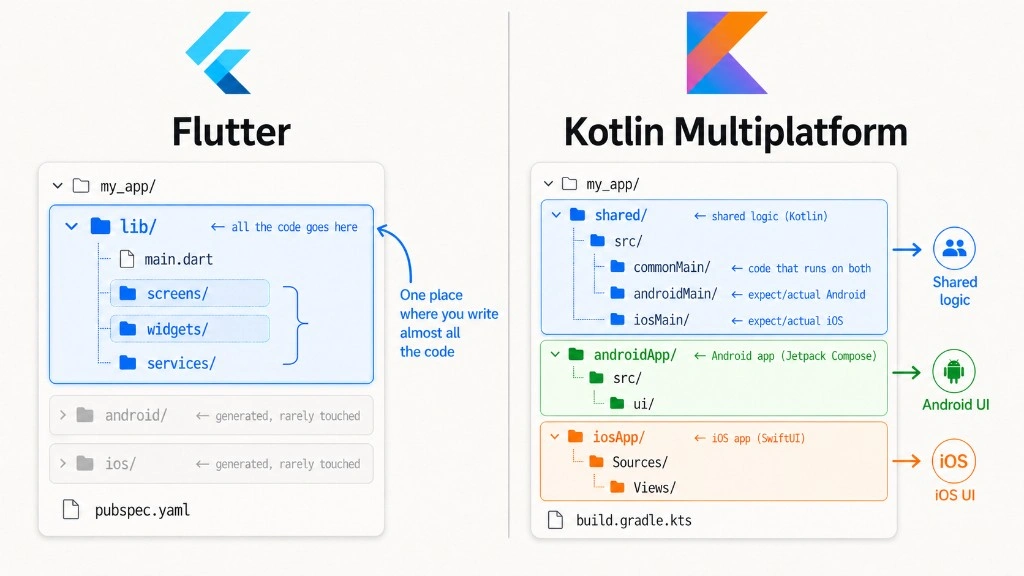
lib/. KMP separates into three blocks — shared/ for common logic, androidApp/ with Jetpack Compose, iosApp/ with SwiftUI.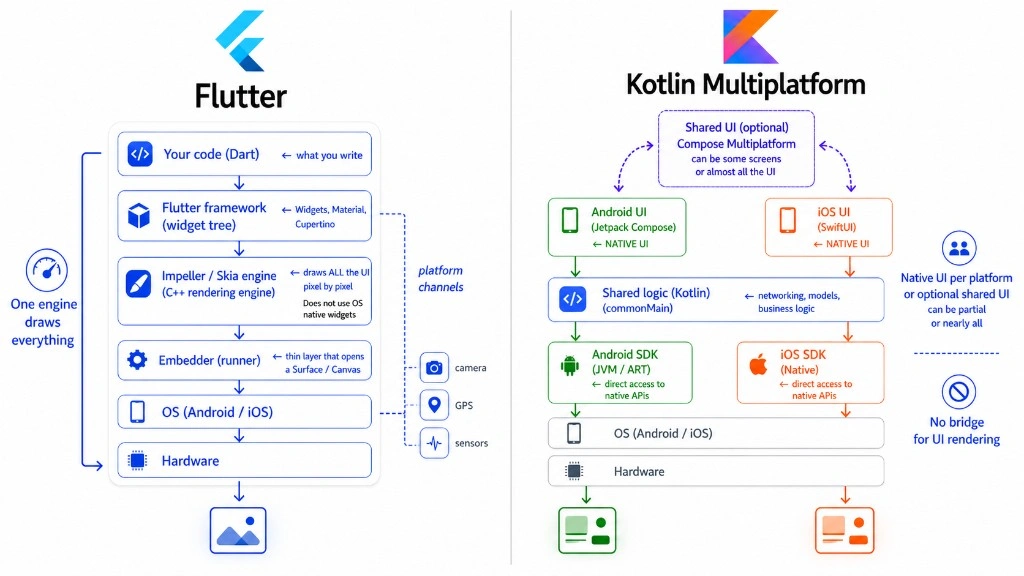
The best of each
Flutter:
- Instant hot reload — ultra-fast iteration
- One UI for all platforms
- Mature ecosystem (pub.dev, plugins, community)
- Impeller engine — consistent 60fps
- Not just mobile — also exports to web and desktop (Windows, macOS, Linux) from the same codebase
KMP:
- 100% native UI on each platform
- Shared logic without compromising UX
- JetBrains backed + official Google support
- Migratable adoption — integrates into existing apps
- With Compose Multiplatform, also reaches desktop and web — same Kotlin, same abstractions
Both are solid bets — but they solve different problems. And both go beyond mobile: the two platforms aim to be complete cross-platform solutions covering mobile, desktop, and web from a single ecosystem.
The best time to start is now
Years ago, getting into cross-platform mobile development meant betting on immature tools, fragmented ecosystems, and incomplete documentation. Today the landscape is radically different.
Flutter has its own graphics engine delivering consistent 60fps, a package ecosystem with thousands of ready-made integrations, and a community that solves problems in real time. KMP has JetBrains and Google backing it, companies like McDonald’s, Netflix, and Airbnb validating it in production, and an architecture that respects each platform’s native UI.
What used to require dedicated teams per platform — with separate budgets and timelines — can now be done by a single developer with the right tool. That’s not an exaggeration: the barrier to entry has never been lower, and the quality of the result has never been higher.
And there’s an accelerator that changes the rules even further: AI agents. In the series on working with agents I’ve explored this in depth — today it’s possible to go from an idea to a working implementation in a fraction of the time it used to take. An agent can generate scaffolding, resolve compilation errors, suggest architecture patterns, and even write tests while you iterate on the UI. Applied to mobile development — where the build, deploy, and test cycle has always been slow — it’s a brutal productivity multiplier.
Whether you’re coming from backend, frontend web, or you simply want to build something that runs on a phone — the tools are ready, the ecosystems are mature, and now you also have agents that shorten the distance between the idea and working code. There’s enough real production behind both options to know you’re not betting in the dark.
The question is no longer whether it’s worth learning mobile development. The question is what you’re going to build first.
Let’s keep building.
Resources
- Flutter — Google’s cross-platform framework; Dart language, Impeller rendering engine
- Kotlin Multiplatform — JetBrains’ approach to sharing logic while keeping native UI per platform
- Compose Multiplatform 1.8.0 — iOS is stable — the milestone that made shared UI production-ready on iOS
- React Native — Meta’s “learn once, write anywhere”; now governed by the React Foundation
- Kotlin for Android — Google’s preferred language for native Android development
- SwiftUI — Apple’s declarative UI framework for native iOS/macOS apps
- .NET MAUI — Microsoft’s cross-platform framework for the .NET ecosystem, successor to Xamarin
- Ionic Framework + Capacitor — web stack inside a native shell, with a bridge to device APIs
- Apache Cordova — the original hybrid runtime (formerly PhoneGap), where my own mobile story started
- Progressive Web Apps — web.dev — installable websites: how far they go and where they hit their limits
- KDoSensei — the hybrid app from my university days, recovered and re-hosted as a static site
- xergioalex/kdosensei — the recovered source and APKs from that project

Stay in the loop
Get notified when I publish something new. No spam, unsubscribe anytime.
No spam. Unsubscribe anytime.